
How to Reset LG TV Remote and Pair It Again
When an LG remote stops responding, the problem does not always mean that the remote is permanently damaged. Weak batteries, lost Bluetooth registration, blocked infrared sensors, temporary TV software errors, and compatibility problems can all prevent normal control.
Learning how to reset lg tv remote controls can help restore the pointer, voice search, navigation buttons, and other features. For an LG Magic Remote, a reset usually means unregistering the remote from the television and pairing it again. A standard infrared remote uses a different process because it normally does not maintain the same Bluetooth connection.
It is also important to separate a remote reset from a TV restart. Restarting or soft resetting the television reloads the operating system without erasing your apps or settings. A factory reset is much more significant because it removes accounts, Wi-Fi details, installed applications, channels, and personal preferences.
This guide explains how to reset lg tv remote models, re-pair a Magic Remote, restart an LG TV, troubleshoot common failures, and use a phone-based Remote TV App while the physical controller is unavailable.
1. What Does It Mean to Reset an LG TV Remote?
Before learning how to reset lg tv remote controls, it helps to understand what type of reset you actually need.
Several different actions are commonly described as a “remote reset,” but they do not produce the same result.
| Action | What it does | Deletes TV settings? |
|---|---|---|
| Replace remote batteries | Restores power and signal strength | No |
| Power reset a standard remote | Clears remaining electrical charge | No |
| Unregister a Magic Remote | Removes its current connection to the TV | No |
| Re-pair a Magic Remote | Registers the remote with the TV again | No |
| Restart the LG TV | Reloads the TV operating system | No |
| Factory reset the LG TV | Returns the TV to initial setup | Yes |
For most Magic Remote problems, how to reset lg tv remote means unregistering and reconnecting the controller. This process is useful when:
- The pointer has disappeared.
- Voice search no longer works.
- Only basic infrared buttons respond.
- The remote disconnects repeatedly.
- The TV no longer recognizes the Wheel or OK button.
- The remote stopped working after a software update.
- The batteries were replaced but the connection did not return.
A standard LG remote usually sends infrared commands and may not require pairing. Resetting this type of remote generally involves removing the batteries, discharging remaining power, installing fresh batteries, and testing the infrared signal.
People asking how do i reset my lg tv remote should avoid factory resetting the television before checking the remote itself. A TV factory reset will not repair damaged buttons, weak batteries, or an incompatible controller.
2. Before You Reset Your LG TV Remote
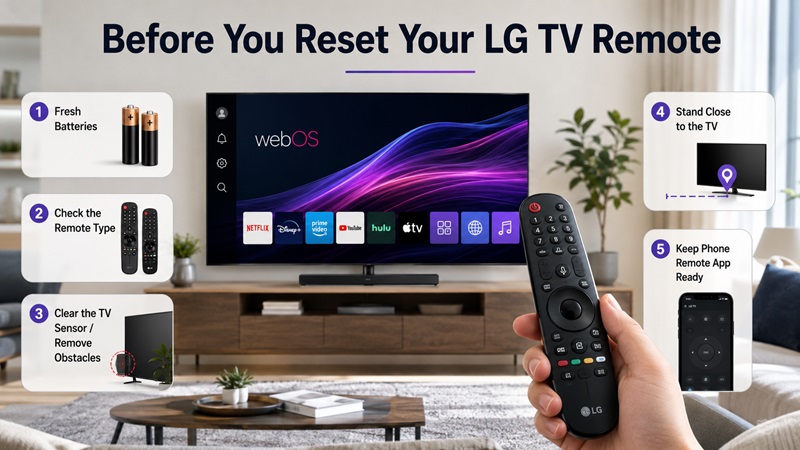
Before starting the how to reset lg tv remote process, complete a few basic checks. Many remote problems can be solved without unregistering the controller or changing the TV settings.
Identify the Remote Type
LG televisions may use:
- An LG Magic Remote with a Wheel or OK button
- A standard infrared LG remote
- A replacement remote
- A third-party universal remote
- A phone-based remote application
Magic Remotes commonly include pointer control, voice input, scrolling, and Bluetooth functions. Standard remotes usually rely on infrared and require a clear line of sight to the television.
Look inside the battery compartment for a model number. Two Magic Remotes may look similar while supporting different TV generations.
Install Fresh Batteries
Use a new matching pair of batteries.
Do not:
- Mix old and new batteries.
- Mix different battery types.
- Reuse batteries from another device without testing them.
- Install batteries with the polarity reversed.
Clean the battery contacts if you see dust or light corrosion. Do not continue using a remote with severe leakage or damaged contacts.
Check the TV Sensor
Make sure the front sensor area is not blocked by:
- A soundbar
- Decorations
- Books
- A game console
- A cabinet door
- Protective film
Basic buttons such as Power may use infrared even when other Magic Remote functions use Bluetooth.
Restart the Television
A temporary TV software problem can prevent the remote from pairing correctly. Turn the TV off, disconnect it from power for about 30 seconds, reconnect it, and wait for the home screen to load.
Keep a Remote TV App available if you need another way to open the TV settings while troubleshooting.
Important: Do not perform a factory reset until you have checked the batteries, sensor, remote model, pairing status, and temporary TV errors.
3. How to Reset an LG Magic Remote
The most common answer to how to reset lg tv remote is to unregister the Magic Remote and pair it again. The button combination can vary by remote generation, so check the manual for your exact model when the following standard method does not work.
Method 1: Hold Back and Home
Many LG Magic Remotes can be reset with the Back and Home buttons.
Follow these steps:
- Install fresh batteries.
- Turn on the LG television.
- Wait until the home screen has fully loaded.
- Stand close to the TV.
- Press and hold Back and Home together.
- Continue holding them for approximately five seconds.
- Watch the remote’s power light.
- Release the buttons when the light flashes.
- Point the remote toward the television.
- Press the Wheel/OK button.
- Wait for a registration or pairing message.
- Test the pointer and navigation controls.
Holding Back and Home removes the existing registration on many Magic Remote models. Pressing Wheel/OK starts the new pairing process.
If the TV does not display a message, wait a few seconds and press Wheel/OK again.
Method 2: Use Home and Settings on Selected Models
Some Magic Remote or AI Remote models use a different reset combination.
The alternative process may involve:
- Turn on the television.
- Press and hold Home and Settings.
- Keep holding for approximately five seconds.
- Wait for the indicator light to flash.
- Release the buttons.
- Point the remote at the television.
- Press Wheel/OK to register it.
Only use this combination when it matches the instructions for your remote model. Button sequences are not identical across every LG controller.
Pair the Magic Remote Again
After unregistering the controller:
- Keep the television turned on.
- Stand within a short distance of the TV.
- Point the remote toward the screen.
- Press the Wheel or OK button once.
- Wait for the pairing notification.
- Move the remote gently to check whether the pointer appears.
Do not press several buttons repeatedly while the television is processing the pairing request.
Test All Important Functions
After completing how to reset lg tv remote, test more than the Power button.
Check:
- Power
- Volume
- Mute
- Home
- Back
- Settings
- Wheel scrolling
- Directional navigation
- On-screen pointer
- Voice search
- Number buttons
- Streaming shortcuts
If Power and Volume work but the pointer does not appear, the infrared controls may be working while Bluetooth registration has failed. Repeat the unregister and re-pair process.
If the remote disconnects again shortly after pairing, replace the batteries, restart the TV, and move other wireless devices away temporarily.
4. How to Reset a Standard LG TV Remote
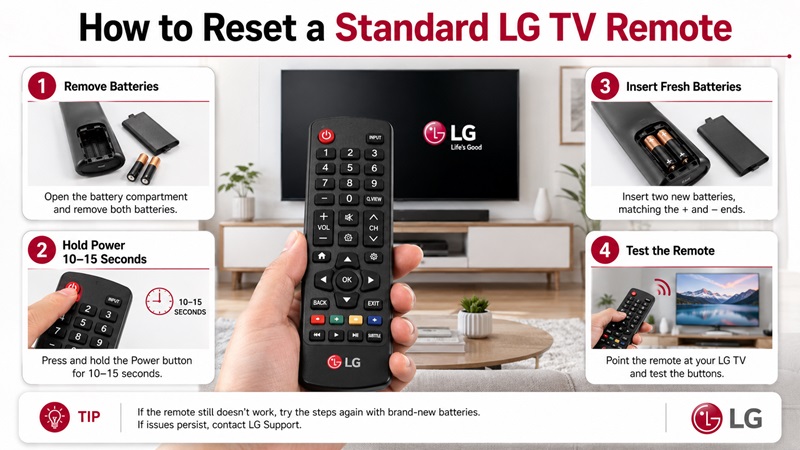
A standard infrared LG remote usually does not require the same registration process as a Magic Remote. Therefore, how to reset lg tv remote instructions depend on whether the controller uses Bluetooth features.
For a standard remote, try a basic power reset:
- Remove both batteries.
- Press and hold the Power button for 10–15 seconds.
- Press several other buttons once.
- Wait approximately 30 seconds.
- Inspect the battery contacts.
- Install a fresh pair of batteries.
- Point the remote directly at the TV.
- Test Power, Volume, Menu, and navigation.
Holding Power while the batteries are removed helps discharge remaining electrical energy inside the remote.
Test the Infrared Signal
Many phone cameras can detect the infrared light from a remote.
To test it:
- Open the camera app on your phone.
- Point the front of the remote toward the camera.
- Press a remote button.
- Watch the phone screen for a flashing light.
The signal may appear white, purple, or pink. Some phone cameras filter infrared, so a missing flash does not always prove that the remote is defective.
If no buttons produce a signal, the remote may have:
- Dead batteries
- Corroded contacts
- A damaged circuit board
- A failed infrared LED
- Stuck buttons
- Liquid damage
If the remote sends infrared but the TV does not respond, check the television sensor and confirm that the controller is compatible with the TV model.
A replacement or universal remote may require its own programming instructions. Do not use Magic Remote reset combinations on a controller that does not include the same buttons.
5. How to Soft Reset or Restart an LG TV With the Remote
Sometimes the remote is working, but the television is slow, frozen, or failing to recognize certain commands. In this situation, learning how to soft reset lg tv with remote may be more useful than resetting the controller.
A soft reset reloads the TV software without deleting:
- Installed apps
- Wi-Fi information
- Picture settings
- Sound settings
- Accounts
- Channels
- Input names
Restart the TV With the Remote
To try how to restart lg tv with remote:
- Close any frozen application if possible.
- Press and hold the Power button on the remote.
- Continue holding it for several seconds.
- Watch for the TV to turn off.
- Wait for the startup logo.
- Release the button when the television begins restarting.
Behavior varies by LG TV generation. Some models may only enter standby instead of completing a full restart.
Power Cycle the Television
When the remote cannot produce a full restart:
- Turn the TV off.
- Disconnect the power cable.
- Wait 30–60 seconds.
- Press the physical Power button on the TV for several seconds.
- Reconnect the power cable.
- Turn the TV back on.
- Wait for webOS to load.
- Pair the Magic Remote again if necessary.
When to Use a Soft Reset
A restart can help when:
- The Magic Remote pointer disappears temporarily.
- An app is frozen.
- The Home menu responds slowly.
- Voice search stops responding.
- Bluetooth pairing repeatedly fails.
- The TV does not recognize recent settings changes.
- The television remains connected but behaves unpredictably.
A soft reset should usually be attempted before a factory reset. It can clear temporary software issues without forcing you to configure the entire TV again.
When how to soft reset lg tv with remote does not work because the television ignores the Power button, use the physical power cycle method.
6. How to Factory Reset an LG TV With the Remote
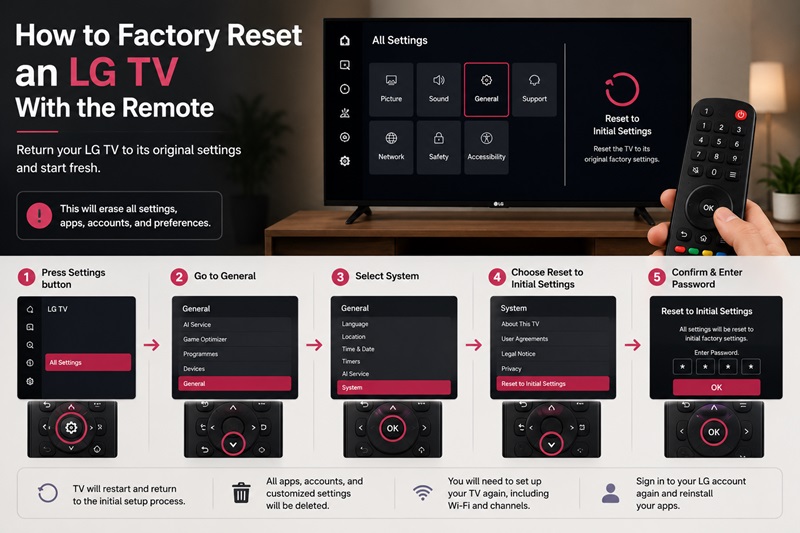
A factory reset is different from how to reset lg tv remote. It erases the television’s personal settings and returns the device to its initial setup condition.
Use a factory reset only when:
- Serious software problems continue after restarting.
- The television is being sold or transferred.
- Accounts cannot be removed normally.
- Settings are severely corrupted.
- LG Support recommends it.
- Network and application errors cannot be resolved another way.
Warning: A factory reset may remove accounts, applications, channels, Wi-Fi details, picture settings, sound preferences, and customized options.
Factory Reset Newer LG TVs
The menu path on many newer webOS models is:
Settings > All Settings > General > System > Reset to Initial Settings
On other versions, the option may appear under:
Settings > All Settings > Support > Reset to Initial Settings
Follow the on-screen instructions and enter the TV password if requested.
Do not guess repeatedly if you do not know the password. Check the manual or contact LG Support for the correct recovery procedure.
After the Factory Reset
The television will usually restart and display the initial setup screen.
You may need to:
- Choose a language.
- Select a country or region.
- Connect to Wi-Fi.
- Accept user agreements.
- Sign in to an LG account.
- Scan for channels.
- Reinstall applications.
- Restore picture and sound settings.
- Reconnect external devices.
- Pair the Magic Remote again.
If you are researching how to restart lg tv with remote, do not select Reset to Initial Settings unless you intentionally want to erase the configuration.
A remote pairing problem alone rarely justifies a full television reset. Try fresh batteries, re-registration, a TV restart, and software updates first.
7. What to Do When the LG TV Remote Still Does Not Work
If how to reset lg tv remote steps do not restore control, use the symptoms to identify the most likely cause.
| Problem | Likely cause | Recommended fix |
|---|---|---|
| Power works but pointer is missing | Magic Remote registration was lost | Unregister and pair again |
| No buttons work | Batteries are dead or remote is damaged | Replace batteries and test infrared |
| Only a few buttons respond | Partial pairing or button damage | Re-pair and test another remote |
| Remote disconnects frequently | Weak batteries or wireless interference | Replace batteries and move closer |
| TV ignores infrared commands | Sensor is blocked or damaged | Clear the sensor area |
| Voice search does not work | Bluetooth pairing or network problem | Re-pair and check the TV connection |
| Remote works only after restarting TV | Temporary software error | Update the television software |
| Pairing always fails | Incompatible or defective remote | Confirm the remote model |
Replace the Batteries Again
Even newly installed batteries can be weak or defective.
Use another fresh matching pair and make sure they fit securely. Loose batteries can cause intermittent disconnections when the remote is moved.
Remove Wireless Interference
Magic Remotes rely on wireless communication for advanced features.
Temporarily move or turn off nearby:
- Bluetooth speakers
- Wireless game controllers
- Routers placed directly beside the TV
- Unnecessary USB wireless devices
- Other Bluetooth remotes
Stand close to the television while pairing.
Update the LG TV Software
Open the TV settings and check for software updates.
After installing an update:
- Restart the television.
- Wait for the home screen.
- Reset the Magic Remote registration.
- Pair it again.
- Test the pointer and voice controls.
Confirm Compatibility
A replacement Magic Remote that looks correct may still be incompatible with your LG television.
Check:
- TV model number
- Remote model number
- Production year
- Supported region
- Voice-feature compatibility
- Bluetooth support
Some replacement remotes provide only basic infrared commands and do not support the on-screen pointer or voice input.
Check for Physical Damage
Inspect the remote for:
- Cracks
- Liquid damage
- Corrosion
- Stuck buttons
- Loose battery contacts
- A damaged Wheel button
- Missing infrared output
If the TV does not respond to any compatible remote, the television’s sensor or wireless hardware may need service.
People asking how do i reset my lg tv remote may ultimately need a replacement if the device has physical damage rather than a pairing problem.
8. Use a Remote TV App While Troubleshooting the Physical Remote
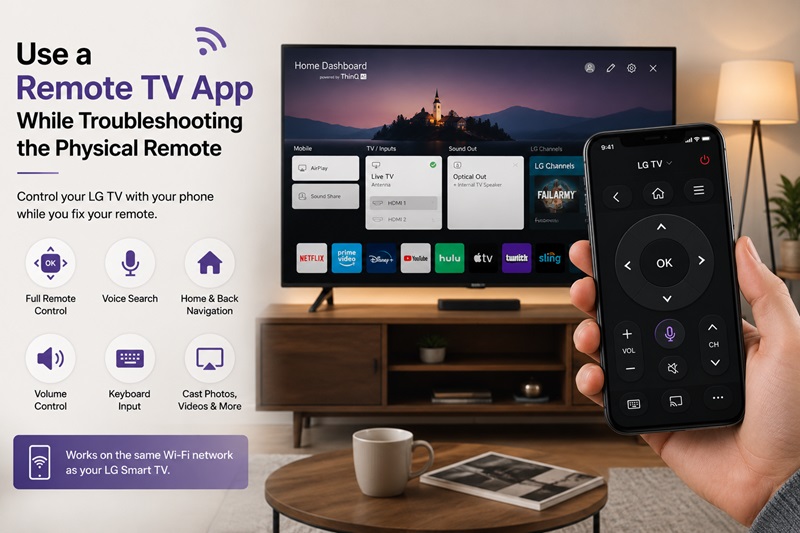
A Remote TV App can provide temporary control while you complete the how to reset lg tv remote process or wait for a replacement controller.
For a compatible LG Smart TV, a phone remote may provide:
- Directional navigation
- Home and Back buttons
- Volume controls
- Keyboard input
- App shortcuts
- Media playback
- Device selection
- Casting on supported models
LG ThinQ is the official mobile option for many compatible LG televisions. Universal remote applications may also support LG TVs along with Roku, Samsung, TCL, Sony, Fire TV, and other platforms.
To connect a phone remote:
- Turn on the LG TV.
- Connect the phone and TV to the same Wi-Fi.
- Open the remote application.
- Scan for available TVs.
- Select the LG television.
- Approve the connection request on the TV.
- Test navigation and volume.
A Wi-Fi app may not find a television that is offline or connected to another network. Some apps also cannot turn on a TV when network standby is disabled.
Use the mobile app to open Settings, restart the television, install updates, or confirm that the TV itself is still responding normally.
The most effective answer to how to reset lg tv remote is usually to replace the batteries, unregister the Magic Remote, and pair it again with Wheel/OK. If the problem continues, restart the TV, check compatibility, update the software, and test another controller before performing a factory reset.
Download TV Remote App