
How to Pair Xfinity Remote to TCL TV: Complete Step-by-Step Guide
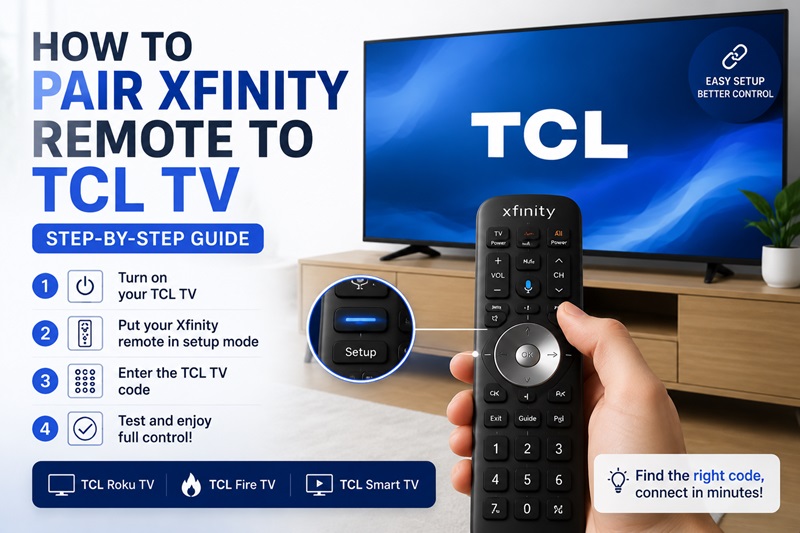
Pairing your remote correctly is the easiest way to control your television without using multiple controllers. If you recently bought a TCL TV or replaced your Xfinity remote, learning how to pair xfinity remote to tcl tv can help you quickly connect both devices and control essential functions like power, volume, and input.
Many users search for how to pair my xfinity remote to my tcl tv because the setup process can be different depending on the TCL TV type and Xfinity remote model. TCL offers several smart TV versions, including Roku TV, Fire TV, and Google TV models, while Xfinity provides multiple remote generations such as XR2, XR5, XR11, XR15, and XR16.
The good news is that most TCL TVs can be connected with an Xfinity remote using either manual code entry or automatic pairing. This guide explains every method, including TCL TV remote codes, Roku TV setup, troubleshooting solutions, and alternative control options.
1. How to Pair Xfinity Remote to TCL TV: Quick Overview
The process of how to pair xfinity remote to tcl tv usually involves three main steps: identifying your remote model, entering the correct TCL TV code, and testing the connection.
Before starting the pairing process, make sure your devices are ready.
Your TCL TV should be turned on and connected properly. Your Xfinity remote should have working batteries and be compatible with TV control. You should also know whether your TCL television is a Roku TV, Fire TV, or another smart TV version.
There are two common ways to connect an Xfinity remote to TCL TV.
Manual Code Pairing
Manual pairing requires entering a specific TCL TV code into your Xfinity remote. This method works well when you know your remote model and have the correct code.
Automatic Remote Pairing
Automatic pairing allows your remote to search for a compatible TV profile without manually entering a code. This option is useful when you do not know the exact tcl tv xfinity remote code.
After successful pairing, your Xfinity remote should control:
- Power on and off.
- Volume adjustment.
- Mute function.
- Input selection.
If your remote controls only some functions, the code may not fully match your TCL TV model.
CTA: If manual setup fails, continue reading to learn how automatic pairing can find the correct connection.
2. What You Need Before Pairing an Xfinity Remote With a TCL TV
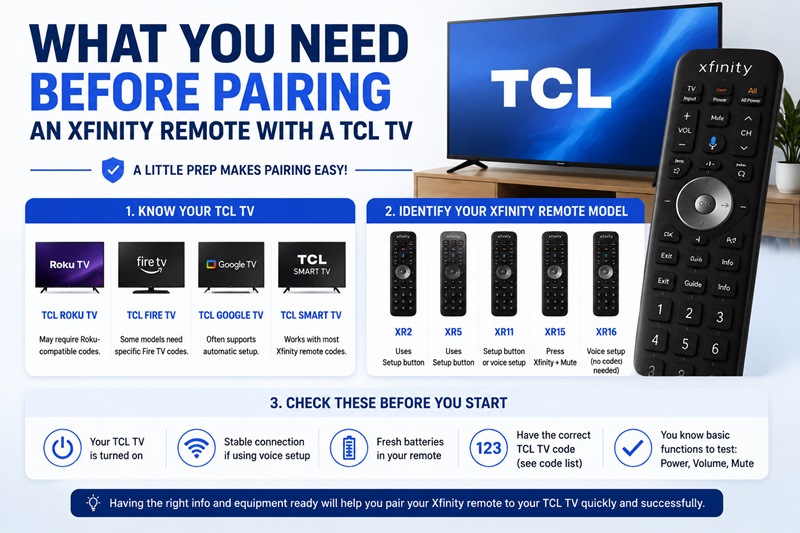
Before learning how to pair xfinity remote to tcl tv, check your TV type and remote model. Choosing the wrong setup method is one of the most common reasons pairing fails.
Check Your TCL TV Type
TCL produces several television versions, and each one may require different setup steps.
| TCL TV Type | Pairing Information |
| TCL Roku TV | Requires Roku-compatible remote setup |
| TCL Fire TV | May require specific TCL Fire TV code |
| TCL Google TV | Often supports automatic setup |
| TCL Smart TV | Compatible with many universal remotes |
For example, users searching for pair xfinity remote to tcl roku tv usually need Roku-compatible setup instructions rather than standard TCL TV pairing.
Identify Your Xfinity Remote Model
The setup process depends heavily on your remote version.
| Xfinity Remote Model | Setup Method |
| XR2 | Setup button + TV code |
| XR5 | Setup button + TV code |
| XR11 | Setup button or automatic search |
| XR15 | Xfinity + Mute button |
| XR16 | Voice setup |
Older remotes usually require manual code entry, while newer voice remotes provide a faster automatic setup experience.
Knowing your remote model before starting makes the process much easier.
3. How to Pair Xfinity Remote to TCL TV Step by Step
This is the main setup section for users searching how to pair xfinity remote to tcl tv.
The exact steps depend on your Xfinity remote model, but most remotes follow a similar process.
Method 1: Pair Xfinity Remote Using Setup Button
This method works for many XR2, XR5, and XR11 remotes.
Step 1: Turn On Your TCL TV
Use your TCL TV power button or original remote to turn the television on.
The TV must be active before programming the Xfinity remote.
Step 2: Enter Setup Mode
Press and hold the Setup button on your Xfinity remote.
Wait until the LED indicator changes color.
This means the remote is ready to receive a TV code.
Step 3: Enter TCL TV Code
Enter a compatible TCL TV remote code.
Common codes include:
- 11756
- 12434
- 12049
After entering the code, wait for the remote confirmation signal.
Step 4: Test Your Remote
Point the remote toward your TCL TV and test:
- Power button.
- Volume buttons.
- Mute button.
- Input button.
If everything works correctly, your remote is successfully paired.
If not, try another code from the available tcl tv xfinity remote code list.
Method 2: Pair Xfinity Voice Remote Without Setup Button
Newer Xfinity remotes such as XR15 use a different process.
Follow these steps:
- Turn on your TCL TV.
- Press and hold the Xfinity button and Mute button together.
- Wait until the LED indicator changes.
- Enter your TCL TV code.
- Test Power and Volume.
This method is commonly used for voice-enabled Xfinity remotes.
4. TCL TV Xfinity Remote Codes: Complete Code List and Setup Guide
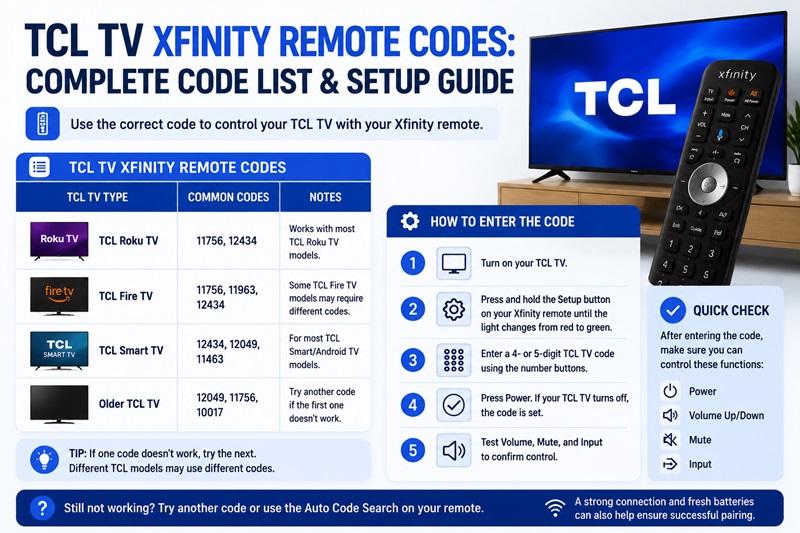
Finding the correct code is one of the most important steps when learning how to pair xfinity remote to tcl tv. A compatible code allows your Xfinity remote to communicate with your TCL television and control basic functions such as power, volume, and input.
The correct code depends on your TCL TV model and your Xfinity remote version. Some TCL Roku TVs, Fire TV models, and standard smart TVs may use different codes.
TCL TV Xfinity Remote Code Table
| TCL TV Model Type | Common Xfinity Remote Codes | Setup Method |
| TCL Smart TV | 11756, 12434, 12049 | Manual code entry |
| TCL Roku TV | 11756, 12434 | Roku-compatible setup |
| TCL Fire TV | TCL Fire TV compatible codes | Code search or automatic setup |
| Older TCL Models | 12049, 11756 | Setup button method |
These codes are common starting points, but compatibility can vary between different TCL television generations.
If the first code does not work, do not assume your remote is incompatible. Try another code or use automatic code search to find the correct match.
How to Find the Correct TCL TV Xfinity Remote Code
When entering a tcl tv xfinity remote code, follow these steps:
- Turn on your TCL TV.
- Put your Xfinity remote into setup mode.
- Enter the selected TCL code.
- Test Power, Volume, and Mute.
- Repeat with another code if needed.
A common mistake is testing only the Power button. Some codes can turn the TV on and off but cannot control volume or other functions.
A successful pairing should allow your remote to manage the main television features.
5. How to Pair Xfinity Remote to TCL Roku TV
Many users specifically search for pair xfinity remote to tcl roku tv because TCL Roku TVs are among the most popular TCL models.
Although TCL Roku TVs use the Roku operating system, many models can still work with Xfinity universal remotes after proper setup.
A roku tv xfinity remote can usually control basic television functions, including:
- Power.
- Volume.
- Mute.
- Input selection.
However, some Roku-specific features may depend on the exact TV model and remote compatibility.
Does Xfinity Remote Work With TCL Roku TV?
Yes, many TCL Roku TVs can be controlled using an Xfinity remote after programming the correct code.
The main requirements are:
Your TCL Roku TV must support external remote control.
Your Xfinity remote must support TV programming.
The correct TCL Roku code must be entered.
If the remote does not respond after setup, try another compatible code or reset the remote before pairing again.
Steps to Pair Xfinity Remote With TCL Roku TV
Follow these steps to connect your devices:
Step 1: Turn On TCL Roku TV
Turn on your TCL Roku TV using the TV button or original remote.
Step 2: Activate Xfinity Remote Setup
For remotes with a Setup button:
Press and hold Setup until the indicator changes.
For newer voice remotes:
Press Xfinity + Mute together.
Step 3: Enter TCL Roku Code
Enter a compatible TCL Roku TV code.
Start with:
11756
12434
Step 4: Test Remote Functions
Check:
Power.
Volume.
Mute.
Input.
If all functions work correctly, your TCL Roku TV and Xfinity remote are connected.
Troubleshooting TCL Roku TV Pairing Issues
If your TCL Roku TV does not respond:
Check your remote batteries.
Make sure you selected the correct TCL TV code.
Reset the Xfinity remote.
Run automatic code search.
Sometimes users think the remote is broken when the actual issue is an incorrect pairing method.
6. How to Connect Different Xfinity Remote Models to TCL TV
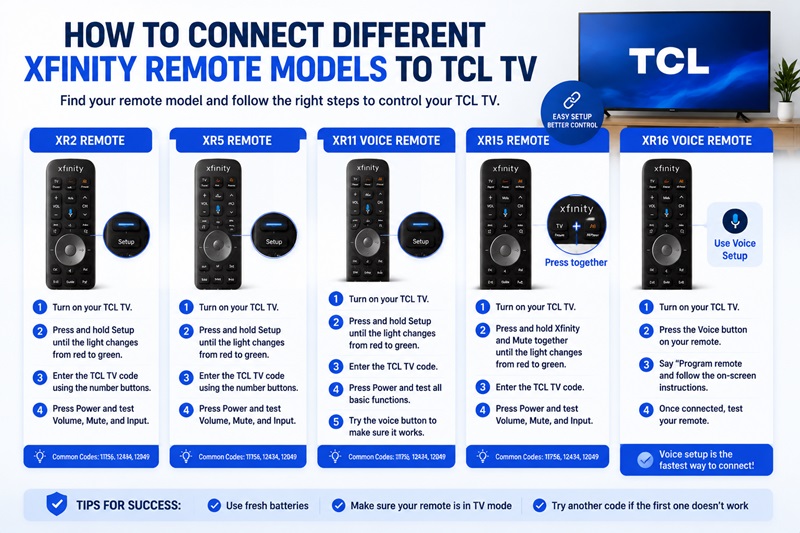
Different Xfinity remotes use different pairing methods. Before trying to pair tcl tv with xfinity remote, identify your remote model to follow the correct instructions.
How to Set Up XR2 Remote With TCL TV
The XR2 is one of the most common Xfinity remotes.
To connect XR2:
- Turn on your TCL TV.
- Press and hold the Setup button.
- Wait for the LED confirmation.
- Enter your TCL TV code.
- Test Power and Volume.
If the first code fails, try another compatible code.
How to Set Up XR5 Remote With TCL TV
The XR5 follows a similar process.
Steps:
- Turn on your TCL television.
- Hold the Setup button.
- Enter the TCL remote code.
- Wait for confirmation.
- Test the remote.
The XR5 works well with many TCL smart TV models when the correct code is used.
How to Set Up XR11 Voice Remote
The XR11 combines traditional buttons with voice functionality.
To pair it:
- Press Setup.
- Enter the TCL TV code.
- Wait for confirmation.
- Test standard controls.
- Test voice commands.
If voice features work but TV controls do not, your remote may only be connected to the Xfinity receiver instead of the TCL TV.
How to Set Up XR15 Remote
The XR15 does not use a traditional Setup button.
Instead:
- Press Xfinity and Mute together.
- Wait for the LED light.
- Enter your TCL TV code.
- Test the connection.
This method is commonly used for newer Xfinity voice remotes.
How to Set Up XR16 Voice Remote
The XR16 provides the simplest setup experience.
To connect:
- Turn on your TCL TV.
- Press the microphone button.
- Say “Program remote”.
- Follow the instructions shown on screen.
The system automatically guides you through pairing.
This is useful for users who do not know their exact tcl tv xfinity remote settings.
7. Why Is My Xfinity Remote Not Pairing With My TCL TV?
Even after following the steps for how to pair xfinity remote to tcl tv, some users experience connection problems.
Most issues are caused by incorrect codes, setup mistakes, or compatibility problems.
Common Pairing Problems and Solutions
| Problem | Possible Cause | Solution |
| Remote does not respond | Weak batteries | Replace batteries |
| Code does not work | Wrong TCL code | Try another code |
| Only Power works | Partial compatibility | Use another code |
| Remote cannot enter setup | Incorrect method | Check remote model |
| TCL TV does not respond | Pairing failure | Reset and reconnect |
Incorrect TCL TV Code
The most common problem is entering the wrong code.
Different TCL models may require different codes, especially between:
- TCL Roku TV.
- TCL Fire TV.
- TCL Smart TV.
Try multiple codes before assuming the remote cannot work.
Remote Was Previously Paired With Another TV
If your Xfinity remote was connected to another television, previous settings may interfere with the new setup.
Reset the remote and start the pairing process again.
Weak Batteries
Low battery power can prevent the remote from sending programming signals correctly.
Replace batteries if:
The LED does not respond.
Buttons work inconsistently.
Pairing fails repeatedly.
TCL Fire TV Compatibility Issues
Some TCL Fire TV models require specific settings.
Users searching for tcl fire tv xfinity remote code should verify their exact TV model because Fire TV versions may use different compatibility profiles.
8. Can You Control a TCL TV Without an Xfinity Remote?
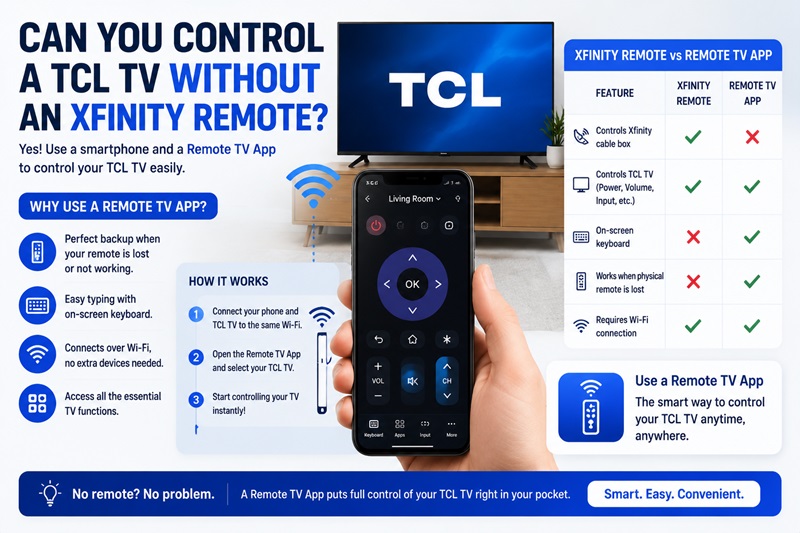
If you cannot complete how to pair xfinity remote to tcl tv or your physical remote is unavailable, there are other ways to control your TCL television. A smartphone-based remote solution can be a convenient backup when your Xfinity remote is lost, damaged, or temporarily unavailable.
A Remote TV App allows you to use your smartphone as a replacement controller for compatible smart TVs. Instead of searching for a missing remote or waiting for new batteries, you can access basic TV controls directly from your phone.
This option is especially useful when:
- Your Xfinity remote stops working.
- You cannot find the correct TCL TV code.
- Your remote is lost.
- You want faster text input when searching on your smart TV.
How Does a Remote TV App Work With TCL TV?
A Remote TV App usually connects to your TCL television through the same Wi-Fi network.
The general setup process includes:
- Install the remote application on your smartphone.
- Connect your phone and TCL TV to the same Wi-Fi network.
- Open the application and search for available devices.
- Select your TCL TV.
- Complete the pairing process.
Once connected, you may be able to control functions such as:
- Power.
- Volume.
- Navigation.
- Keyboard input.
- Menu controls.
The available features depend on your TCL TV operating system, including Roku TV, Fire TV, or other smart TV platforms.
Xfinity Remote vs Remote TV App: Which One Should You Use?
Both options provide TV control, but they work differently.
| Feature | Xfinity Remote | Remote TV App |
| Physical buttons | Yes | No |
| Controls Xfinity receiver | Yes | Limited |
| Smartphone keyboard | No | Yes |
| Works as backup remote | No | Yes |
| Requires Wi-Fi | Usually no | Usually yes |
An Xfinity remote remains the best choice for controlling Xfinity cable services. However, a Remote TV App is useful when you need quick access to your TCL TV without a physical remote.
9. Frequently Asked Questions About Pairing Xfinity Remote With TCL TV
How Do I Pair My Xfinity Remote to My TCL TV?
To pair your Xfinity remote with TCL TV, turn on your television, enter setup mode on your remote, enter the correct TCL TV code, and test Power, Volume, and Mute functions.
The exact steps depend on your Xfinity remote model. Older remotes usually use the Setup button, while newer voice remotes use Xfinity + Mute or automatic pairing.
What Is the TCL TV Xfinity Remote Code?
Common tcl tv xfinity remote code options include 11756, 12434, and 12049. However, the correct code depends on your TCL TV model and your Xfinity remote version.
If one code does not work, try another compatible code or use automatic code search.
Can I Pair Xfinity Remote to TCL Roku TV?
Yes. Many TCL Roku TVs can be controlled using an Xfinity remote after proper setup.
Users looking for pair xfinity remote to tcl roku tv should confirm their remote model and use a Roku-compatible TCL code.
Why Is My Xfinity Remote Not Working With TCL TV?
Your Xfinity remote may fail because of:
- Incorrect TCL TV code.
- Weak batteries.
- Wrong setup method.
- Previous remote pairing.
- TV compatibility issues.
Resetting your remote and repeating the setup process usually solves the problem.
Does TCL Fire TV Work With Xfinity Remote?
Some TCL Fire TV models can work with Xfinity remotes, but compatibility depends on the exact TV model and remote version.
If you are searching for tcl fire tv xfinity remote code, check your television model first because Fire TV editions may require different setup methods compared with Roku or standard TCL TVs.
How Long Does It Take to Pair Xfinity Remote With TCL TV?
Most users can complete the process within a few minutes.
Manual setup usually takes less time when you already know the correct code. Automatic pairing may take longer because the remote needs to scan available TV profiles.
10. The Best Way to Pair Xfinity Remote to TCL TV Successfully
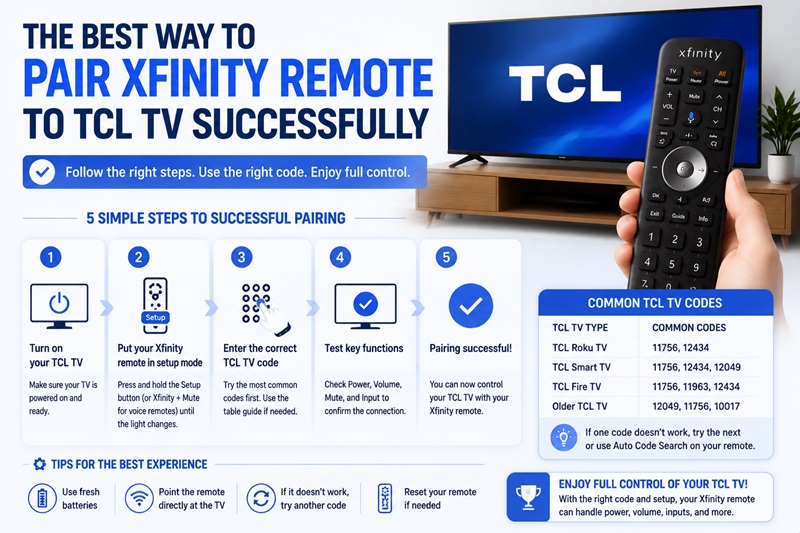
Learning how to pair xfinity remote to tcl tv becomes much easier when you follow the correct setup order.
Start by identifying your TCL TV type and Xfinity remote model. A TCL Roku TV, TCL Fire TV, and standard TCL Smart TV may require different pairing methods.
Next, try the recommended TCL TV codes and test every important function, including Power, Volume, Mute, and Input. If manual code entry does not work, use automatic pairing or reset your remote before trying again.
The most common reasons for pairing failure are incorrect codes, outdated remote settings, weak batteries, or compatibility differences between TCL TV versions.
For users who cannot connect their physical remote, a Remote TV App can provide a convenient backup solution for controlling compatible TCL televisions from a smartphone.
By following the correct steps, you can successfully pair tcl tv with xfinity remote and enjoy easier control of your entertainment system.
Download the ultimate Remote TV App and control your favorite smart TVs with ease. Whether you use LG, Sony, Samsung, TCL, Hisense, Philips, Roku TV, Android TV, Google TV, or many other popular brands, our app lets you turn your smartphone into a powerful TV remote in seconds. Enjoy quick setup, an intuitive interface, and convenient features like touchpad navigation, keyboard input, volume control, channel switching, and more. Download the Remote TV App today and take full control of your TV—no physical remote required.
