
How to Connect Firestick to New WiFi Without Remote
A new router or WiFi password can leave your Fire TV Stick offline when the physical remote is missing or broken. Fortunately, learning how to connect firestick to new wifi without remote does not always require buying another remote. You can often restore control with mobile devices, a TV remote, a keyboard, or a compatible replacement remote.
The main obstacle is network discovery. A mobile remote app generally needs the phone and Firestick on the same local network. Amazon’s guidance directs users to open the Fire TV app, sign in, select the remote option, and follow the on-screen setup process.
The quickest answer to how to connect firestick to new wifi without remote is to create a mobile hotspot with the same name and password as the old WiFi. The Firestick may reconnect automatically, allowing a second phone to control it and select the new network. The guide below also covers situations where you do not know the old WiFi details.
Can You Connect a Firestick to New WiFi Without a Remote?
Yes. The solution to how to connect firestick to new wifi without remote is to give the device another form of input long enough to open its Network settings.
When you remember the exact name and password of the old WiFi, the two-device hotspot method is usually the best choice. One device recreates the previous network, while a second device runs the Fire TV app. You can then choose the new WiFi from the Firestick menu.
You may also connect firestick to wifi without a remote through HDMI-CEC, which lets some television remotes control devices connected through HDMI. A USB keyboard, USB mouse, or compatible Fire TV remote can provide direct navigation as well.
If you need to connect firestick to wifi without the remote and cannot remember the old network details, skip the hotspot method. Start with the TV remote, keyboard, mouse, or replacement remote instead.
The correct method depends on your TV, Firestick model, and available equipment. For most homes, how to connect firestick to new wifi without remote starts with the hotspot option.
Explore Related Articles: How to Control a Samsung TV With Your Phone Without WiFi
What You Need Before Changing the Firestick WiFi
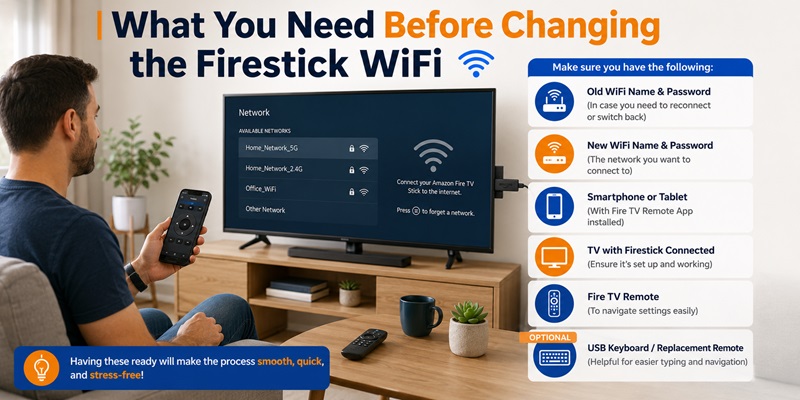
Before attempting how to connect firestick to new wifi without remote, gather the following:
- The exact name and password of the old WiFi network
- The name and password of the new network
- One or two phones, tablets, or hotspot-capable devices
- The Fire TV app installed on the phone used as the remote
- The television remote and access to TV settings
- A compatible USB OTG adapter and keyboard or mouse, if available
- A compatible replacement Fire TV remote, if needed
Keep the Firestick powered and connected to the correct HDMI port. If it appears frozen, restart it. Amazon recommends restarting the Fire TV device and network equipment when WiFi problems persist.
Hotspot names and passwords are case-sensitive. If you do not know the old details, move directly to a physical-control method.
5 Ways to Connect Firestick to New WiFi Without a Remote
The following five methods cover the most common versions of how to connect firestick to new wifi without remote. Try the two-device setup first, then move to hardware-based options if the Firestick does not reconnect.
Method 1: Use Two Mobile Devices
The two-device method is often the easiest way to connect fire stick to new wifi without remote after replacing a router.
On the first device, create a hotspot with the exact old WiFi name and password. Choose WPA2 when available, turn on the hotspot, and restart the Firestick. Because those details are already saved, the Firestick may join automatically.
Connect the second phone to the same hotspot. Open the Fire TV app, choose the Firestick, and enter the pairing code displayed on the television. Once the app responds as a remote, open:
Settings > Network > New WiFi network > Enter password > Connect
After the Firestick connects, move the second phone to the new WiFi and reopen the app.
This approach helps you connect firestick to new internet without remote or solve how to connect to firestick without remote and new wifi. If reconnection fails, recheck every character and try a 2.4 GHz hotspot.
This is the most practical answer to how to connect firestick to new wifi without remote when you still know the old credentials.
Method 2: Use an iPhone and Another Hotspot Device
To connect firestick to wifi without remote with iphone, use one device to provide the temporary hotspot and the iPhone as the remote. For the clearest setup, separate the roles: one device provides the hotspot, while the iPhone joins it and acts as the remote.
Create the matching hotspot on another phone, tablet, hotspot, or travel router. Use the old network name and password, then restart the Firestick.
On the remote iPhone, join that hotspot through Settings > Wi-Fi. Open the Fire TV app, select the Firestick, enter the TV code, and navigate to Settings > Network. Choose the new WiFi and type the password. Then move the iPhone to the new network.
This method can connect firestick to wifi without remote control when you have access to an iPhone and one additional hotspot-capable device. If discovery fails, confirm that the app has Local Network permission in iPhone settings.
Method 3: Use Your TV Remote With HDMI-CEC
Another solution for how to connect firestick to new wifi without remote is the remote supplied with your television. Many TVs support HDMI-CEC, which allows basic commands to pass between the TV and a connected HDMI device.
The setting may have a brand-specific name, so look for HDMI-CEC, device control, or HDMI control in the TV menu.
Open the TV settings, enable HDMI-CEC, and switch to the Firestick’s HDMI input. Test the directional, OK, Back, and Home buttons. If the Fire TV interface responds, navigate to Settings > Network, select the new WiFi, and enter its password.
This is a strong option for how to connect firestick to wifi without original remote, especially when you do not remember the previous WiFi name or password. Support varies by TV model, HDMI port, and remote, so some buttons may not work.
Method 4: Use a USB Keyboard or Mouse
A keyboard or mouse can help with how to connect firestick to new wifi without remote when the Firestick is offline and no compatible TV remote is available.
Use a compatible USB OTG adapter that supplies power while adding a USB port. Attach the adapter and keyboard or mouse, then restore power.
After the home screen loads, test the arrow keys, Enter, Escape, or the mouse pointer. Go to Settings > Network, choose the new network, and enter the password. A keyboard is particularly convenient for long WiFi passwords.
This method can connect firestick to wifi without the remote, although accessory compatibility differs by Firestick generation.
After the Firestick is online, connect your phone to the same network and use the mobile app for everyday control.
Method 5: Pair a Replacement Firestick Remote
A compatible replacement remote is a reliable long-term solution for how to connect firestick to new wifi without remote. Check compatibility before purchasing or borrowing one.
Insert fresh batteries and place the remote near the Firestick. Restart the Firestick if necessary, then hold the Home button for about 10 seconds. Amazon recommends holding Home for 10 seconds when a Fire TV remote is not paired.
Once paired, go to Settings > Network, choose the new WiFi, and enter its password. Amazon also lists Settings > Controllers & Bluetooth Devices > Amazon Fire TV Remotes > Add New Remote as the menu path for adding another remote when you already have control of the device.
A borrowed remote can be enough to connect fire stick to new wifi without remote, after which you can return to the Fire TV app.
Explore Related Articles: Why Does the Firestick Remote App Keep Disconnecting?
How to Connect Firestick to Hotel WiFi Without Remote
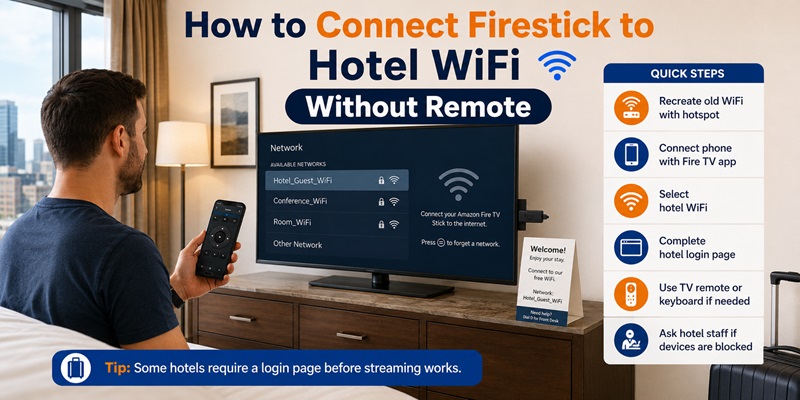
Travel adds a captive portal and unfamiliar network to how to connect firestick to new wifi without remote. The hotel network may require a room number, access code, surname, or agreement screen.
First, recreate your home network with a mobile hotspot. Use the same WiFi name and password, restart the Firestick, and connect a second phone to the hotspot. Open the Fire TV app and select the hotel network from Settings > Network.
This process may connect firestick to hotel wifi without remote, but you must still complete any hotel login page that appears. Use the mobile app, television remote, or keyboard to enter the requested information.
You can also test the hotel TV remote through HDMI-CEC or use a compact keyboard for portal forms.
Some hotels isolate devices on guest WiFi. The phone and Firestick may both have internet while the app cannot detect the streamer. Ask staff whether they can register the Firestick or provide another network. Do not bypass hotel security.
A permitted travel router can also keep both devices on one private local network.
How to Connect Firestick Without Remote or WiFi
The hardest form of how to connect firestick to new wifi without remote occurs when the Firestick is completely offline. A mobile remote cannot provide normal control until the phone can reach the Firestick over a network.
To solve how to connect to fire stick without remote or wifi, create one temporary control path:
- Recreate the old network with a matching hotspot.
- Use the TV remote through HDMI-CEC.
- Connect a keyboard or mouse through a compatible OTG adapter.
- Pair a compatible replacement remote.
Use the hotspot only when you know the old WiFi name and password. Otherwise, choose a physical input option. Once you can navigate, open Settings > Network, select an available connection, and enter the password.
Avoid a factory reset unless other methods fail. You will still need a way to navigate setup afterward.
For a fully offline Firestick, HDMI-CEC or a replacement remote is generally the simplest way to restore access and finish how to connect firestick to new wifi without remote.
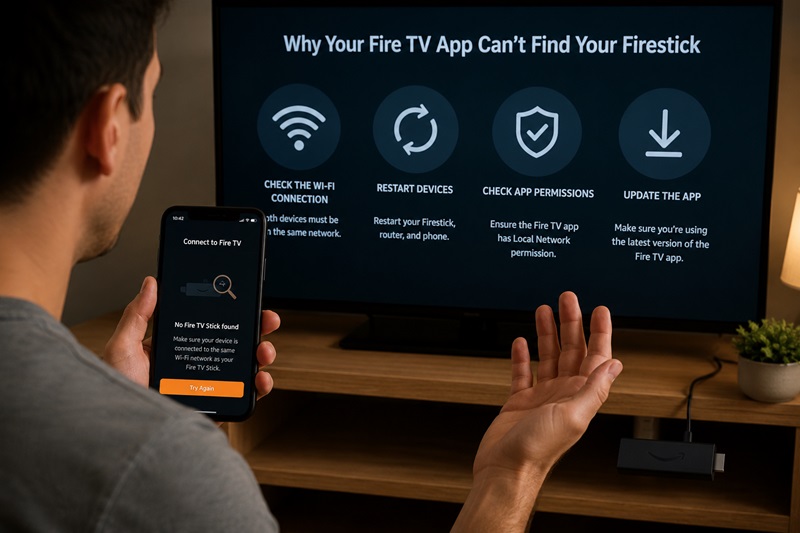
What to Do When the Fire TV App Cannot Find Your Firestick
Even after completing how to connect firestick to new wifi without remote, the Fire TV app may not show the device immediately. Common causes include different networks, incorrect hotspot details, or blocked local communication.
Confirm that the phone and Firestick are on the exact same network. A guest network and the main home network can use similar names but remain separated. Temporarily disable VPN connections and, if necessary, mobile data.
Compare the old and recreated hotspot details character by character, including capitalization and spaces. Restart the hotspot and Firestick after changes.
Restart the app and phone as well. Amazon’s WiFi troubleshooting guidance recommends restarting the Fire TV device and resetting or restarting the network connection when problems continue.
On iPhone, enable Local Network access. On Android, review nearby-device or local network permissions. Update the app when available.
When the app displays the Firestick but cannot pair, watch the television for a code and enter it carefully. These steps are also useful when trying to connect firestick to wifi without a remote after installing a new router.
If the app still fails, use HDMI-CEC, a keyboard, or a replacement remote. This keeps how to connect firestick to new wifi without remote from depending entirely on mobile discovery.
Control Your Firestick Without the Original Remote
After learning how to connect firestick to new wifi without remote, select the method that fits your situation:
| Situation | Best option |
| You know the old WiFi name and password | Two-device hotspot |
| You have an iPhone and another device | Matching hotspot plus Fire TV app |
| You do not know the old network | TV remote, keyboard, or replacement remote |
| The Firestick is fully offline | Physical input or matching hotspot |
| You are at a hotel | Hotspot, HDMI-CEC, or keyboard |
| You need dependable long-term control | Compatible replacement remote |
For most router changes, the two-device hotspot is the fastest answer to how to connect firestick to new wifi without remote because it uses the network credentials already stored on the Firestick. HDMI-CEC is the best no-purchase alternative when you have the television remote but do not know the old password.
A replacement remote provides consistent control, while a keyboard or mouse works as an emergency option. Once the Firestick joins the new WiFi, move the phone to that network.
Knowing how to connect firestick to new wifi without remote can prevent an unnecessary reset and get the device back online quickly. Keep the app installed and store your network details securely.
Explore Related Articles: Button on Samsung TV: Complete Control and Remote Guide
