
Sony TV Remote App for Android: Complete Download and Setup Guide
A lost or damaged television remote can quickly interrupt your entertainment experience. Simple actions such as adjusting volume, switching HDMI inputs, opening streaming applications, or entering search terms become frustrating when the physical controller is unavailable.
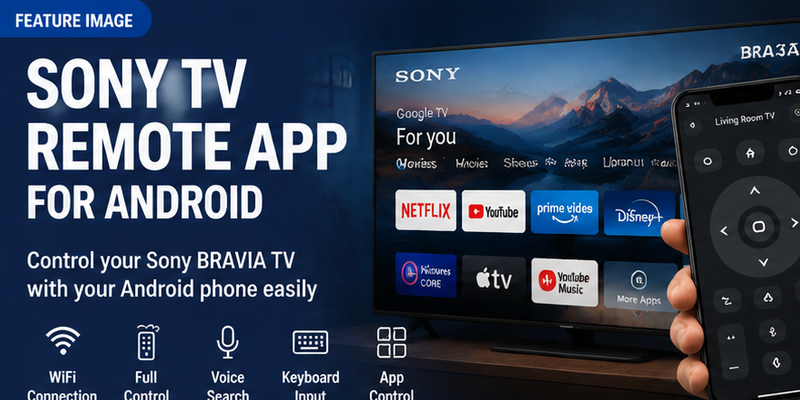
For Sony BRAVIA owners, an Android smartphone can provide a practical alternative. A sony tv remote app for android allows users to transform their phone into a virtual controller and access many of the functions normally available on a physical remote.
However, choosing the correct solution is important because Sony televisions use different platforms depending on the model and release year. Newer BRAVIA televisions commonly use Google TV, while older models may use Android TV or Sony’s previous Smart TV systems. The remote application that works for one television may not work for another.
A reliable sony tv remote app for android should offer stable connectivity, clear compatibility information, trustworthy development, and useful daily functions. The goal is not simply replacing buttons but creating a smoother way to interact with the television.
With a smartphone remote, users can often perform tasks such as:
- Changing volume
- Navigating menus
- Searching content
- Entering text with a phone keyboard
- Opening applications
- Controlling playback
- Using voice search
This guide explains how Sony Android remote applications work, which options are worth considering, how to download them safely, and how to connect your Android phone to a Sony BRAVIA TV.
1. What Is Sony TV Remote App for Android and How Does It Work?
A sony tv remote app for android is a mobile application that allows an Android phone to communicate with a Sony Smart TV and act as a remote controller.
Unlike a traditional remote that sends infrared signals directly to the television, modern mobile remote solutions usually communicate through the home network.
The connection normally works like this:
Android Phone → WiFi Router → Sony BRAVIA TV
This network-based approach allows smartphones to provide more advanced features than traditional remotes.
Instead of only sending button commands, a mobile application can exchange information with the television and provide features such as keyboard input, device discovery, and smart platform integration.
For example, searching for a movie on a Sony Google TV using the physical remote may require selecting each letter manually. With an Android phone, users can simply type the title using the smartphone keyboard.
This makes a sony tv remote app for android especially useful for:
- Streaming searches
- Account login
- WiFi setup
- App navigation
- Smart TV settings
However, mobile remote apps are not identical to physical remotes. Some advanced buttons or hardware-specific functions may still require the original controller.
Before installing an application, users should identify their Sony TV platform:
| Sony TV Platform | Common Remote Solution |
| Google TV | Google TV mobile remote features |
| Android TV | Android-compatible remote solutions |
| Older Sony Smart TV | Check model-specific support |
| Non-smart TV | Usually requires infrared or physical remote |
Understanding the television platform prevents downloading an application that cannot communicate with the TV.
How Android Remote Apps Connect to Sony BRAVIA TV
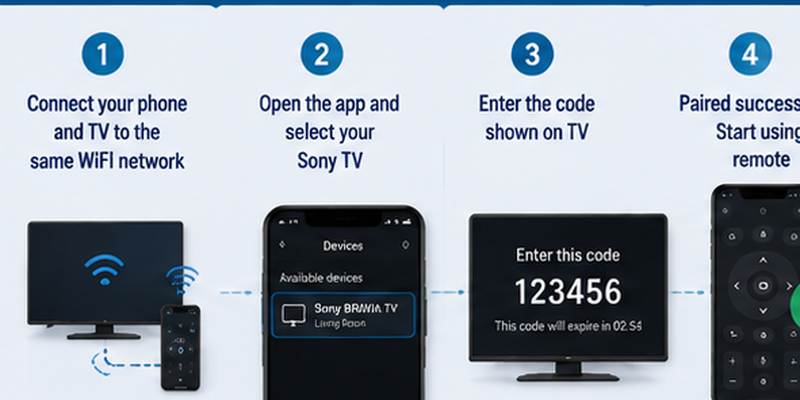
Most modern Sony Android remote applications require the phone and television to be connected to the same WiFi network.
The setup process usually follows these steps:
- Install a compatible remote application.
- Connect the Android phone and Sony TV to the same WiFi.
- Open the application.
- Select the television from available devices.
- Enter the pairing code shown on the TV.
- Confirm the connection.
The pairing code is an important security step because it prevents random devices nearby from controlling the television.
A successful connection depends on several conditions:
| Requirement | Why It Matters |
| Same WiFi network | Allows phone and TV communication |
| Updated software | Improves compatibility |
| Correct permissions | Allows device discovery |
| Supported TV model | Enables remote functions |
| Stable router connection | Prevents lag and disconnects |
If the phone cannot find the TV, the problem is usually not the application itself. Common causes include different WiFi networks, VPN interference, disabled permissions, or unsupported television models.
A good sony tv remote app for android should reconnect easily after the first successful setup.
Why Use a Phone Instead of a Physical Sony Remote?
A physical remote is still useful, but smartphones offer several advantages that make them a valuable backup or replacement.
The biggest benefit is availability. People usually keep their phone nearby, while a television remote can disappear between cushions, run out of batteries, or become damaged.
A smartphone remote is useful when:
- The original remote is missing
- Batteries are empty
- Buttons stop responding
- You need faster text input
Another major advantage is typing.
Smart TVs require text input frequently:
- Searching YouTube videos
- Finding movies
- Logging into accounts
- Entering WiFi passwords
Using a phone keyboard is significantly faster than navigating letters with a physical controller.
A mobile remote can also improve accessibility. Larger touchscreen controls may be easier for some users compared with small physical buttons.
However, there are still situations where the original remote is better:
- Factory reset
- Initial TV setup
- Offline recovery
- Advanced hardware controls
The ideal setup is often using both. Keep the physical remote available while using the Android remote app for convenience.
📖 Read More Sony TV Articles:
Sony TV Remote Download: How to Install and Use the Sony TV Remote App
2. Best Apps to Control Sony BRAVIA TV
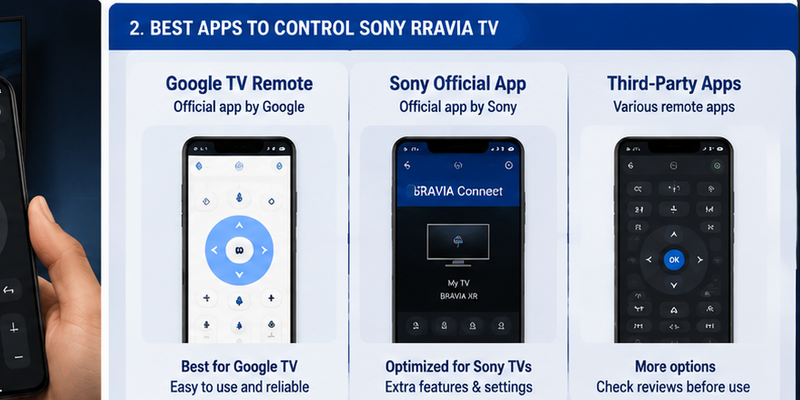
Choosing the best sony tv remote app for android depends on your Sony television model and operating system.
Not every application labeled “Sony remote” is officially supported. Some apps are developed by independent companies and may work differently depending on the TV.
Before downloading, check:
- Sony TV model
- Android TV or Google TV version
- Application developer
- Available features
- User reviews
Google TV Remote for Sony Android TV
Many newer Sony BRAVIA televisions use Google TV as their operating platform.
For these models, Google’s remote features are often the most integrated solution.
Google-based remote control can provide:
- Direction navigation
- Select button
- Back button
- Home access
- Volume control
- Keyboard input
- Voice search
The pairing process typically uses a verification code displayed on the television screen.
This makes Google’s solution one of the strongest options for users looking for a sony tv remote app for android free download.
The main advantage is ecosystem compatibility.
Sony BRAVIA Google TV already uses:
- Google account services
- Google Assistant
- Google Play applications
- Google TV interface
Therefore, Android users can often achieve a smoother experience compared with generic remote applications.
Sony Official Remote Solutions
Sony has provided different mobile control solutions across different generations of BRAVIA televisions.
Depending on the television model and region, Sony-supported applications may provide:
- Remote control functions
- Device management
- Content browsing
- Smart features
However, Sony’s television ecosystem has changed significantly as Google TV became the standard platform for many newer BRAVIA models.
Because of this, users should always verify compatibility before installing an application.
A remote solution designed for an older Sony television may not support newer Google TV models, and the opposite can also happen.
The safest approach is checking:
- TV model number
- Operating system
- Supported applications
Third-Party Sony Remote Apps
Third-party remote applications are another option for Android users.
These apps may provide additional features such as:
- Custom button layouts
- Universal device support
- Widgets
- Multiple TV control
- Alternative navigation styles
They can be useful, but users should evaluate them carefully.
| Evaluation Factor | Why It Matters |
| Developer information | Confirms who created the app |
| Reviews | Shows real user experience |
| Permissions | Protects privacy |
| Subscription details | Avoids unexpected payments |
| Compatibility list | Prevents connection issues |
Some third-party applications advertise themselves as free but require payment for important features such as unlimited usage or advanced controls.
Before installing a sony tv remote app for android, always check what features are actually included in the free version.
Turn your phone into a smart Sony TV remote. Connect over Wi-Fi in minutes and enjoy smooth navigation, volume control, channel switching, and media playback without the original remote.
Download Sony TV Remote📘 Find the Right Guide
Sony TV Remote Download: How to Install and Use the Sony TV Remote App
3. How to Download Sony TV Remote App for Android Safely
4. How to Connect Android Phone to Sony TV Remote
After installing a suitable sony tv remote app for android, the next step is connecting your phone with the Sony BRAVIA television.
The setup process is usually simple, but many connection problems happen because users skip basic preparation steps. A smartphone remote does not communicate with the TV in the same way as a traditional controller. Instead of pointing the phone toward the screen, the application usually communicates through the home network.
Before starting, prepare:
- Sony BRAVIA TV turned on
- Android phone with the remote application installed
- Phone and TV connected to the same WiFi network
- Updated TV software
- Updated remote application
- Bluetooth and required permissions enabled
A stable network connection is the foundation of a reliable mobile remote experience.
Connect Phone and TV to the Same WiFi
The first requirement for most Sony Android remote solutions is that both devices use the same WiFi network.
Check your Sony TV:
- Open Settings.
- Go to Network settings.
- Confirm the current WiFi connection.
Then check your Android phone:
- Open WiFi settings.
- Connect to the same network.
- Disable VPN temporarily if enabled.
A common reason users cannot connect is that the phone and TV are connected to different networks.
For example:
- Phone: Home WiFi
- TV: Guest WiFi
Both devices may have internet access, but they cannot communicate with each other.
Avoid using guest networks because many routers block communication between connected devices for security reasons.
You should also check whether your router has:
- Device isolation enabled
- Firewall restrictions
- Multiple networks with different permissions
After confirming the network, open the remote application again and search for available devices.
Pair Android Phone With Sony TV Using Code
Most modern Sony Google TV and Android TV models use a pairing code.
This security step ensures that only authorized devices can control the television.
The general process is:
- Open the Android remote application.
- Select your Sony BRAVIA TV.
- Wait for a pairing request.
- Look at the television screen.
- Enter the displayed code on your phone.
- Confirm the connection.
Once successful, the phone should display the virtual remote interface.
Test several controls:
- Volume up and down
- Home button
- Back button
- Direction arrows
- Select button
- Keyboard input
If these functions respond correctly, your sony tv remote app for android setup is complete.
Test Remote Functions After Pairing
Successful pairing does not always mean every feature will work.
Sony televisions support different features depending on:
- TV model
- Google TV or Android TV version
- Region
- Application version
Use this checklist:
| Feature | Test |
| Navigation | Move through menus |
| Select | Open apps and settings |
| Home | Return to TV home screen |
| Back | Exit menus |
| Volume | Adjust sound |
| Keyboard | Enter text |
| Voice | Search content |
If basic navigation works but some advanced controls do not, the limitation is usually related to the TV model rather than the application.
A good mobile remote should handle the functions you use most frequently.
📘 Find the Right Guide: Sony TV Remote for iPhone: Control Your Sony TV on iOS
5. Features You Can Use With Sony Android Remote App
A modern sony tv remote app for android can provide much more than simple button replacement.
Because smartphones include touch screens, keyboards, microphones, and powerful connectivity, they can sometimes make TV control easier than a traditional remote.
Control Volume, Power, and Navigation
The most important purpose of a remote application is replacing everyday buttons.
A typical Sony Android remote can provide:
- Power control
- Volume adjustment
- Mute
- Directional navigation
- Home
- Back
- Enter/select
These functions cover most daily television activities.
For example, imagine switching from a streaming application to a gaming console.
With a physical remote:
- Find the controller.
- Press Home.
- Navigate through menus.
- Open inputs.
With a smartphone remote:
- Open the application.
- Tap Home.
- Select Input.
- Choose HDMI.
This makes an Android remote especially useful as a backup controller.
Use Phone Keyboard for Faster Searching
One of the biggest advantages of a sony tv remote app for android is smartphone keyboard support.
Typing on a television using directional buttons is slow and inconvenient.
Common situations where keyboard input helps include:
- Searching YouTube videos
- Entering Google account information
- Logging into streaming applications
- Typing WiFi passwords
- Searching Google TV content
Instead of selecting letters individually, users can type normally on their Android phone.
For example:
Searching:
“best action movies 2026”
takes only seconds using a phone keyboard.
This feature alone makes many users continue using mobile remote applications even after finding their original controller.
Control Apps and Voice Search
Sony BRAVIA televisions are designed around streaming and smart features.
A mobile remote can make it easier to manage applications such as:
- Netflix
- YouTube
- Prime Video
- Disney+
- Spotify
- Other installed apps
Voice search is another useful feature.
Instead of typing:
“science fiction movies”
users can simply speak the request.
Voice functionality depends on:
- TV model
- Language
- Google account
- Region
- Microphone permissions
Some applications provide a microphone button directly inside the remote interface, while others rely on Google TV features.
A smartphone remote is therefore not only a replacement for lost buttons. It can improve the overall smart TV experience.
Experience a faster and more convenient way to control your Sony Smart TV. Pair your device quickly and access all the essential remote functions anytime, anywhere.
Download Sony TV Remote📖 Read More Guides: Sony TV Phone Remote: Turn Your Phone Into a Sony Remote
6. Can You Use Sony TV Remote App Without WiFi?
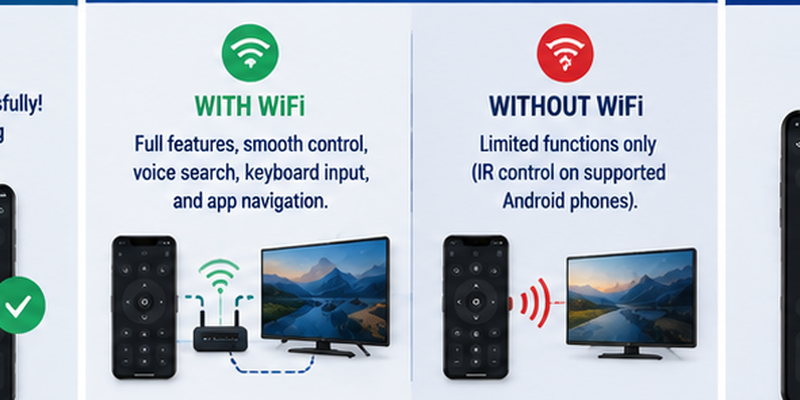
Many users ask whether a sony tv remote app for android can work without WiFi.
The answer depends on the connection method.
Most modern Sony BRAVIA remote applications require WiFi because they communicate through the network.
The normal connection is:
Android Phone → WiFi Router → Sony TV
Without this connection, the application usually cannot discover or control the television.
Using Infrared Android Phones
Some older Android smartphones include infrared (IR) transmitters.
These devices can work similarly to traditional remotes.
The connection becomes:
Android Phone → Infrared Signal → Sony TV
Advantages:
- Does not require WiFi
- Works when TV network is unavailable
- Can control basic functions
Limitations:
- Most modern Android phones do not include IR hardware
- Smart functions are unavailable
- Usually limited to basic commands
Infrared apps may control:
- Power
- Volume
- Channels
- Input
However, they normally cannot provide:
- Keyboard typing
- Voice search
- App navigation
- Smart-home features
What To Do When Sony TV Is Offline
If your Sony TV has lost internet access, try these recovery methods.
Use Physical Remote
The original controller can restore:
- Network settings
- WiFi connection
- Google account access
Use TV Buttons
Some Sony televisions include physical controls for basic operation.
Connect Ethernet Cable
If your TV has an Ethernet port:
- Connect the TV directly to your router.
- Wait for network connection.
- Open the remote application.
- Pair again.
Use Temporary Replacement Remote
A basic replacement remote can restore access until the mobile remote is configured.
A remote TV app is powerful, but it cannot always solve a completely offline TV problem without another way to access network settings.
📖 Explore Articles: Which Sony TV Is the Best? How to Choose the Right One
7. Sony TV Remote App Not Working? Common Fixes
Even after successful installation, a sony tv remote app for android may sometimes stop connecting.
Most problems are caused by network settings, permissions, or outdated software.
Check WiFi and Network Connection
Start with the basics.
Confirm:
- Phone and TV use the same WiFi
- TV is connected to the internet
- VPN is disabled
- Router allows device communication
Restart the router if necessary.
Some connection problems disappear after refreshing the network.
Restart TV and Android Phone
A complete restart can fix temporary communication issues.
Follow this order:
- Close the remote application.
- Restart Android phone.
- Turn Sony TV off.
- Disconnect TV power for 30 seconds.
- Turn TV back on.
- Open the application again.
This clears temporary software errors.
Update Apps and Sony TV Software
Compatibility issues often happen because one device is running outdated software.
Check:
Android Phone
Update:
- Remote application
- Google TV application
- Android system
Sony TV
Update:
- System software
- Google TV services
- Network settings
Newer application versions may require updated television software.
Re-Pair the Television
If the TV appears but buttons do not work:
- Remove the TV from the application.
- Restart both devices.
- Add the TV again.
- Enter a new pairing code.
This creates a fresh connection.
Check Android Permissions
Android can block device discovery if permissions are disabled.
Allow:
- Nearby devices
- Network access
- Bluetooth
- Location when required
Without these permissions, the application may not find the television.
💡 Discover Helpful Guides: Sony Universal Remote TV Codes: Full Programming Guide
8. Sony Remote App vs Physical Remote: Which One Should You Choose?
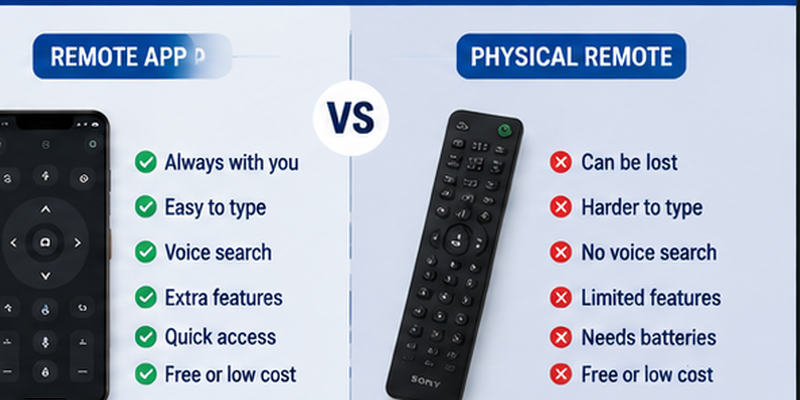
A smartphone remote is convenient, but it does not completely replace a physical Sony controller.
The best choice depends on your situation.
| Option | Advantages | Limitations |
| Physical Sony Remote | Works offline, reliable | Can be lost or damaged |
| Android Remote App | Keyboard, convenience, backup | Requires network |
| Universal Remote | Controls multiple devices | Limited smart functions |
| Infrared App | Works without WiFi | Requires IR hardware |
Advantages of Mobile Remote Apps
A smartphone remote provides several benefits.
Always Available
Your phone is usually nearby, while a remote can disappear easily.
Faster Searching
Typing is much easier with a smartphone keyboard.
Better Smart Features
Mobile apps can provide:
- Voice search
- Touch controls
- Quick app access
- Device management
Backup Solution
A mobile remote helps when:
- Batteries die
- Remote is missing
- Buttons stop working
When You Still Need the Original Remote
A physical remote remains important for:
- First-time setup
- Factory reset
- Offline recovery
- Certain advanced settings
For the best experience, use both:
- Physical remote for setup and emergency situations
- Android app for daily convenience
This combination gives you flexibility without depending on only one control method.
9. Frequently Asked Questions About Sony TV Remote Apps
Is Sony TV Remote App Free?
Many Sony TV remote solutions are available without a separate subscription. However, some third-party applications may include premium plans.
Always check the application details before installation.
Can Android Control Sony TV Without Remote?
Yes, if the television supports mobile control and has network access.
An Android phone can replace many daily remote functions.
Why Cannot My Phone Find Sony TV?
Common reasons include:
- Different WiFi networks
- Disabled permissions
- VPN interference
- Unsupported TV model
- Outdated software
- Router restrictions
Does Every Sony BRAVIA TV Support Remote Apps?
No.
Compatibility depends on:
- TV platform
- Model year
- Software version
- Region
Always verify your Sony TV model before choosing an application.
Final Recommendation
A sony tv remote app for android is one of the easiest ways to control a Sony BRAVIA television without relying only on the physical remote.
The recommended setup process is:
- Identify your Sony TV platform.
- Install a trusted Android remote solution.
- Connect phone and TV to the same WiFi.
- Complete pairing with the verification code.
- Test navigation, volume, keyboard, and voice features.
- Keep the original remote as a backup.
For users searching sony tv remote app for android free download, the safest approach is choosing a verified application, checking compatibility, and avoiding apps with unclear permissions or hidden subscription costs.
A reliable mobile remote does more than replace lost buttons. It makes controlling your Sony Smart TV faster, easier, and more convenient for everyday use.
Download Sony TV Remote