
TCL TV Remote Download: Control Your TCL TV With a Phone
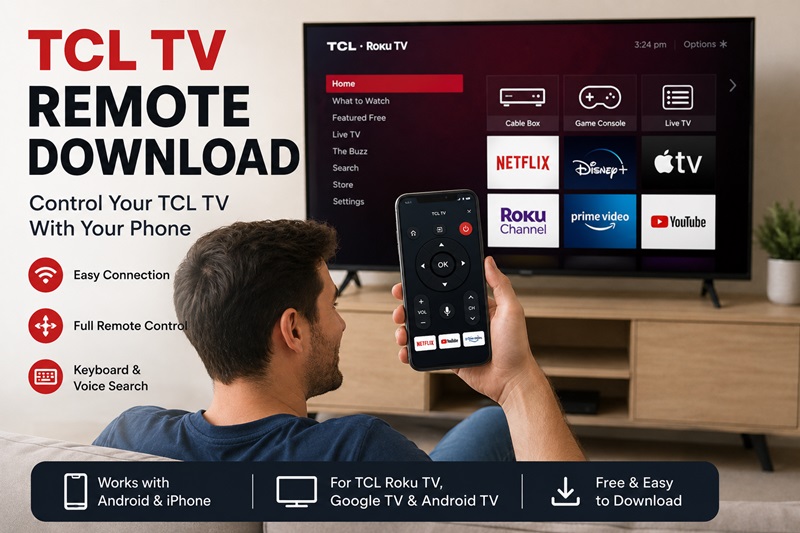
Losing your TCL remote can make it difficult to change channels, open streaming apps, adjust the volume, or even complete the initial TV setup. Fortunately, a tcl tv remote download can turn a compatible Android phone or iPhone into a convenient touchscreen controller.
Before installing an app, identify the operating system used by your television. TCL sells TVs powered by Roku TV, Google TV, Android TV, and other platforms. A Roku app designed for a TCL Roku TV may not directly control a TCL Google TV, even when both televisions have the same brand name.
The basic tcl tv remote download process involves choosing the correct application, installing it from Google Play or the Apple App Store, and connecting the phone and television to the same Wi-Fi network. Once connected, the phone may provide volume controls, menu navigation, text input, voice search, streaming shortcuts, and media casting.
This guide explains how to download tcl tv remote apps, p air them with different TCL platforms, use a phone when Wi-Fi is unavailable, and solve common connection problems.
1. Is There an App for a TCL TV Remote?
Yes. If you are asking is there an app for tcl tv remote, several options are available. However, the correct app depends on whether your television runs Roku TV, Google TV, Android TV, or another supported TCL platform.
Common options include:
- The Roku mobile app for TCL Roku TVs
- The Google TV app for compatible TCL Google and Android TVs
- TCL Home for supported TCL models and regions
- A third-party universal remote application
- An infrared remote app for older TVs when the phone has an IR blaster
A tcl tv remote mobile app normally connects through the same local Wi-Fi network used by the television. The application searches for compatible devices and displays the available TVs on the phone.
When choosing an app for tcl tv remote, do not rely only on the television’s screen size. A 55-inch or 65-inch TCL television may run Roku TV, Google TV, or Android TV depending on its model and market.
Check the startup logo, home screen, or Settings > System > About menu to identify the platform. Roku TVs normally show Roku branding and a grid-style home screen. Google TVs include Google recommendations, profiles, and the Google Play ecosystem.
A free app may include ads, premium controls, or a subscription. Review the developer, compatibility list, permissions, ratings, and in-app purchases before starting the tcl tv remote download.
2. Choose the Right Remote App for Your TCL TV
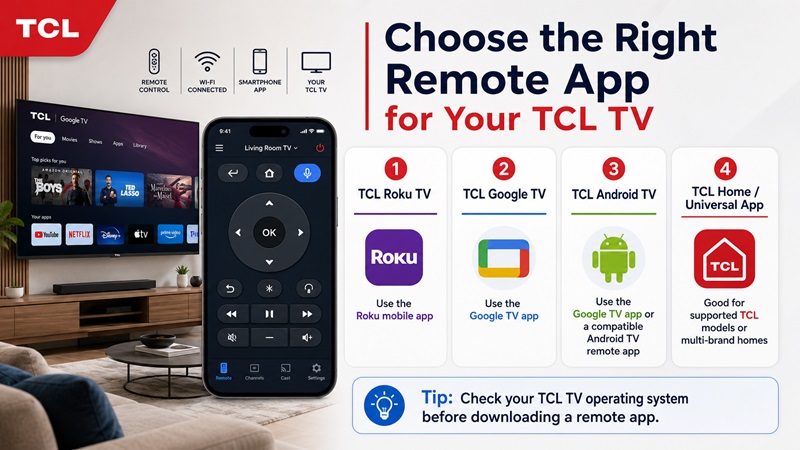
Selecting the correct application is the most important part of a successful tcl tv remote download. The TV brand alone does not determine which app will work.
TCL Roku TV
For a TCL Roku TV, start with the Roku mobile app. This option is suitable when the television’s home screen displays Roku channels, inputs, settings, and streaming tiles.
A roku tcl tv remote app can typically provide:
- Directional navigation
- Home and Back buttons
- Playback controls
- Phone keyboard input
- Private listening on supported devices
- Voice search where available
- Channel shortcuts
The phone and TCL Roku TV generally need to use the same Wi-Fi network. Once the app finds the TV, select the device and open the Remote section.
The Roku application controls the Roku operating system. It does not automatically control a TCL Google TV simply because the television was manufactured by TCL.
TCL Google TV or Android TV
For TCL Google TV or Android TV models, the Google TV app is usually the first option to try. On a compatible Android phone, open the Google TV application and select the remote or Connect TV feature.
An android tcl tv remote app setup may require a pairing code displayed on the television. Enter the code on the phone and confirm the connection.
A compatible tcl tv remote app for android can offer:
- Direction pad controls
- Swipe navigation
- Voice search
- Keyboard input
- Home and Back commands
- Playback control
The exact interface may change depending on the Google TV app version and your Android device.
TCL Home
TCL Home may provide remote functions for compatible televisions and regions. Depending on the model, available features may include keyboard input, voice commands, media sharing, and basic navigation.
Check the TCL Home store listing and your television documentation before assuming that every TCL TV is supported.
Universal Remote Apps
A universal Remote TV App is useful when you own televisions from several brands or want one interface for multiple devices.
Before installing one, confirm that it supports your TCL operating system. A general app may support Roku TV but not every Google TV feature, or vice versa.
The best app for tcl tv remote is usually the application designed for the platform running on the television. Universal options become more useful when multi-brand control, casting, or a consistent interface matters more than platform-specific tools.
3. How to Download a TCL TV Remote on Android and iPhone
The tcl tv remote download process should begin in the official app store for your phone. Avoid unverified download sites and modified applications.
Download on Android
To complete a how to download tcl tv remote search on Android:
- Open the Google Play Store.
- Tap the search bar.
- Search for the appropriate app:
- Roku for a TCL Roku TV
- Google TV for a TCL Google or Android TV
- TCL Home for a supported TCL model
- A compatible universal remote app
- Open the application listing.
- Check the developer name.
- Review supported platforms and devices.
- Read the recent reviews.
- Check whether the app includes ads or subscriptions.
- Tap Install.
- Open the app after installation.
When looking for a tcl tv remote app free download, remember that “free download” does not necessarily mean every feature is free. Premium remote layouts, casting, keyboard tools, or ad removal may require payment.
After installation, allow Nearby Devices, Bluetooth, Local Network, or Location access when those permissions are necessary for TV discovery.
Download on iPhone
To use a tcl tv remote iphone solution:
- Open the Apple App Store.
- Search for Roku, TCL Home, or a compatible remote application.
- Check the developer and TV compatibility.
- Review in-app purchases and privacy details.
- Tap Get.
- Open the app.
- Allow Local Network access when requested.
- Connect the iPhone and TCL TV to the same Wi-Fi.
Users searching for a tcl tv remote app free iphone option should check whether the remote controls are available without a subscription. Some applications are free to install but limit their main controls after a trial.
The same warning applies to a free tcl tv remote app for iphone. Read the subscription screen carefully before accepting a trial or purchase.
Avoid Unverified APK Files
You may see websites offering a tcl tv remote pro apk outside Google Play. Installing APK files from unknown sources can create security and compatibility risks.
An unofficial file may be:
- Outdated
- Modified
- Incompatible with your Android version
- Missing security updates
- Designed to collect unnecessary information
- Falsely presented as an official TCL product
For a safe download remote tv tcl process, use Google Play, the Apple App Store, or a source directly identified by the TV platform provider.
4. How to Connect the TCL TV Remote App to Your TV
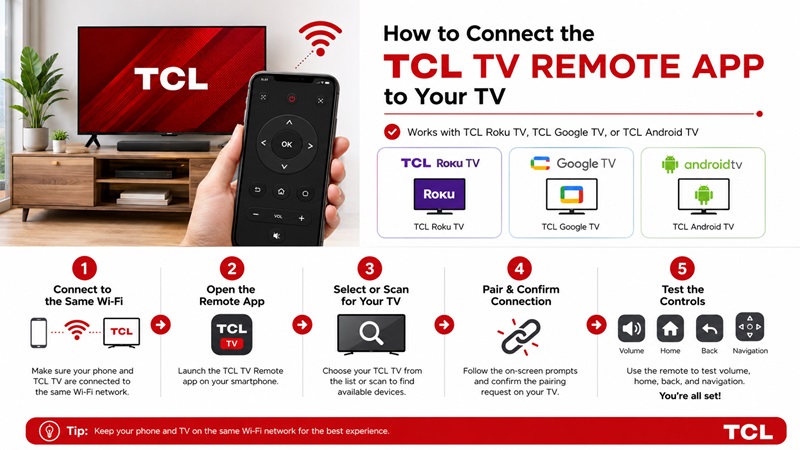
After completing the tcl tv remote download, connect the phone and television through the same local network.
Check the Wi-Fi Network
Turn on the TCL TV and open its network settings. Note the complete Wi-Fi name.
Then open the phone’s Wi-Fi settings and select the same network. Avoid guest or public Wi-Fi because these networks often prevent connected devices from communicating with one another.
Two Wi-Fi names can look similar but remain separate. For example:
- Home Network
- Home Network 5G
- Home Network Guest
If the TV and phone use different networks, the tcl remote tv app may not find the television.
Temporarily disable mobile data or a VPN if the phone repeatedly leaves Wi-Fi during setup.
Connect a TCL Roku TV
To connect a TCL Roku TV:
- Open the Roku app.
- Select Devices.
- Wait for the TV to appear.
- Tap the TCL Roku TV.
- Allow the connection to complete.
- Open Remote.
- Test the directional pad and Home button.
If the TV does not appear, confirm that mobile app control is enabled in the Roku system settings.
The app remote tv tcl connection will not work when the Roku TV is offline or isolated from the phone by a guest network.
Connect a TCL Google or Android TV
To connect a supported TCL Google or Android TV:
- Open the Google TV app.
- Select Connect TV or the remote icon.
- Choose the TCL television.
- Wait for a pairing code to appear on the TV.
- Enter that code on the phone.
- Tap Pair.
- Test navigation and text entry.
Some applications use automatic discovery instead of a pairing code. Always follow the instructions shown by the app and TV.
Test the Remote Controls
After connecting the tcl tv remote control app, test:
- Power, when supported
- Volume
- Mute
- Channel controls
- Home
- Back
- Direction pad
- Input
- Keyboard
- Voice search
- Playback buttons
Power-on support varies. Some TCL TVs disable their network connection when fully turned off. A network standby or quick-start setting may be required before the phone can wake the television.
5. What Can a TCL Smart TV Remote App Do?
A tcl smart tv remote app can provide more than a digital direction pad. The available features depend on the TV platform, application, model, and region.
Basic Remote Controls
Most apps include:
- Volume up and down
- Mute
- Channel navigation
- Home and Back
- Menu navigation
- Playback controls
- Input switching where supported
These functions make a tcl tv remote free app useful when the original controller is missing or has stopped responding.
Phone Keyboard
Typing with a physical TV remote can be slow. A compatible phone keyboard lets you enter:
- Movie titles
- Search phrases
- Email addresses
- App names
- Login information
Keyboard input may not work in every password field or streaming app.
Voice Search
Supported apps may let you search for movies, open applications, or issue commands using the phone microphone.
Voice support depends on the TV platform and app. A TCL Roku TV and TCL Google TV may offer different commands.
Media Casting
Some remote apps can share:
- Photos
- Personal videos
- Music
- Presentations
- Other supported media
Casting compatibility depends on the file format, app, network, and television.
Control Multiple TCL TVs
A universal app may store several compatible televisions. This can be helpful in homes with multiple TCL models or different television brands.
A search for a tcl 65 inch tv remote app should focus on the operating system rather than the screen size. A 65-inch TCL Roku TV needs a Roku-compatible app, while a 65-inch TCL Google TV needs a Google TV-compatible solution.
A free tv remote app tcl option may cover basic controls but place casting, keyboard, or multi-device management behind a premium plan. Check the feature list before installing.
6. Can You Use a TCL TV Remote App Without Wi-Fi?
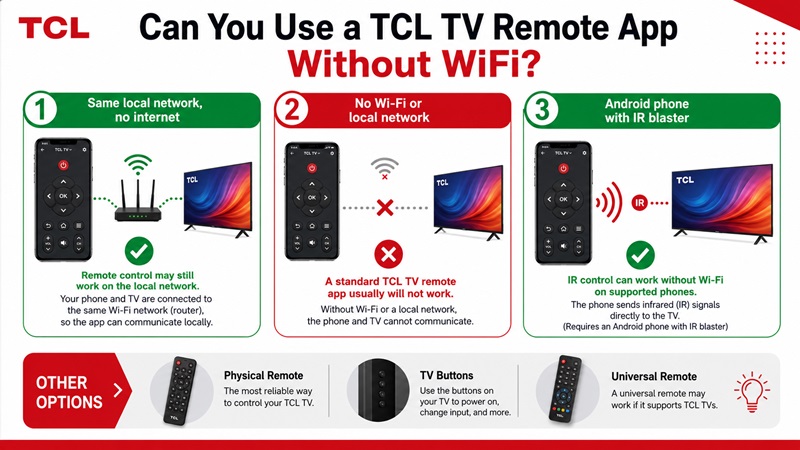
Most network-based remote applications require a local connection. Therefore, a standard tcl tv remote without wifi setup is usually limited.
No Internet, but the Router Still Works
Wi-Fi and internet access are not the same thing. The phone and TV may still communicate over the local router even when the internet service is temporarily unavailable.
In this situation, the remote controls may work, while streaming apps remain offline.
No Local Wi-Fi Network
A tcl tv remote app without wifi cannot normally send network commands when the phone and TV have no shared local connection.
Mobile data alone does not create a direct remote connection. The television must also join the phone’s hotspot or another shared network.
A hotspot may work when:
- The TCL TV is already configured to join it
- You still have a physical way to enter the hotspot password
- A second phone is available for remote control
Infrared Control
Some Android phones include an infrared blaster. With compatible hardware and software, an IR app can control a traditional TCL television without Wi-Fi.
A tcl tv remote control app without wifi requires:
- An Android phone with a built-in IR transmitter
- An app that includes compatible TCL infrared commands
- A TV that receives standard IR signals
- A clear line of sight between the phone and television
An iPhone does not include a built-in IR blaster.
Other Options
When no Wi-Fi or infrared control is available, use:
- The physical buttons on the television
- A replacement TCL remote
- A programmed universal remote
- Ethernet where the TV and network support it
A listing described as free tcl tv remote or tcl tv remote free does not guarantee offline control. Check whether it connects through Wi-Fi or IR before downloading.
7. What to Do When the TCL TV Remote App Does Not Work
If the application fails after the tcl tv remote download, troubleshoot the TV platform, network, permissions, and compatibility.
Confirm the Correct Platform
A Roku app will not directly control a TCL Google TV. A Google TV remote may not be the correct solution for a TCL Roku TV.
Return to the TV home screen or system information and verify the operating system.
Check the Wi-Fi Connection
Make sure the phone and TCL TV use the same network.
Avoid:
- Guest Wi-Fi
- Public networks
- Hotel networks
- Isolated smart-device networks
- Different routers or hotspots
If the television is offline, reconnect it before reopening the app.
Review Phone Permissions
On Android, check:
- Nearby Devices
- Bluetooth
- Local Network
- Location when required
On iPhone, enable:
- Local Network
- Bluetooth when required
A denied permission can stop a free tcl tv remote app from finding the TV.
Restart Everything
Follow this order:
- Close the application.
- Restart the phone.
- Restart the TCL TV.
- Restart the router.
- Wait for the TV to reconnect.
- Open the application.
- Scan for the TV again.
Disable VPN Temporarily
A VPN, firewall, proxy, or private DNS tool may interfere with local device discovery.
Disable it temporarily, reconnect the phone to Wi-Fi, and test the app. Turn the security tool back on after troubleshooting.
Update the App and Television
Install the latest app update from the official store. Then check the television’s system settings for software updates.
Outdated software may cause a tcl tv remote free app to disconnect, crash, or display an incorrect device status.
Remove and Reconnect the Television
Delete the saved TCL TV from the application and repeat the pairing process.
Approve any connection request or pairing code shown on the television.
Reinstall the App
When the app remains unresponsive:
- Uninstall it.
- Restart the phone.
- Repeat the download tcl tv remote process from the official store.
- Grant the required permissions.
- Connect the phone and TV to the same Wi-Fi.
- Add the TV again.
An android tcl tv remote app may work on one TCL platform but not another. Verify the compatibility list before reinstalling repeatedly.
8. Which Is the Best TCL TV Remote App for Your Device?
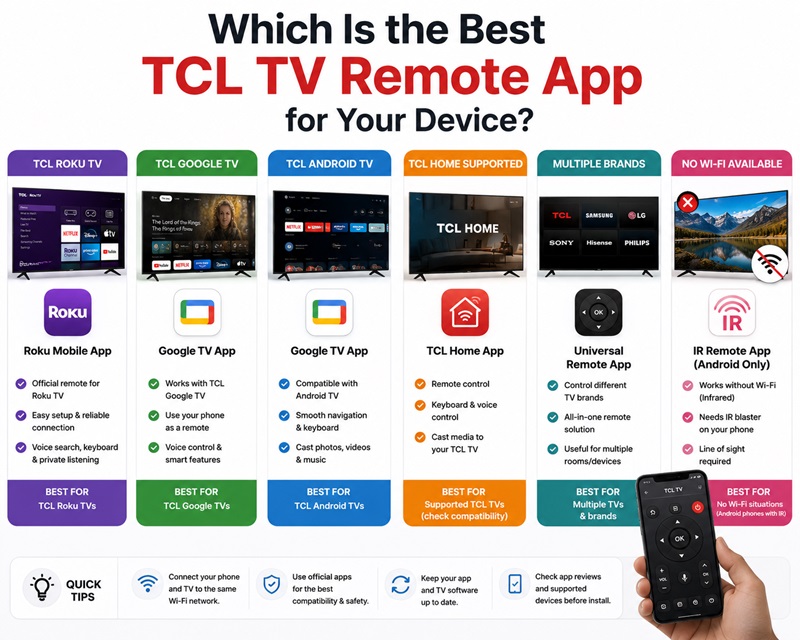
The best tcl tv remote app depends on the operating system running on your television.
| TCL TV type | Recommended starting option |
|---|---|
| TCL Roku TV | Roku mobile app |
| TCL Google TV | Google TV app |
| TCL Android TV | Google TV or a compatible Android remote |
| TCL TV supported by TCL Home | TCL Home |
| Multiple television brands | Universal Remote TV App |
| Older non-smart TCL TV | IR app or physical remote |
| No Wi-Fi connection | IR-capable Android phone or physical remote |
The official application for the TV platform is normally the best place to begin. It is more likely to support platform-specific features and receive compatible updates.
A universal app may be a better choice when you:
- Own TVs from several brands
- Want one interface for several rooms
- Need casting and keyboard tools
- Prefer a consistent remote layout
- Want to replace several physical remotes
Do not choose an app only because it is described as a free tcl tv remote app for iphone or Android. Review its subscription, supported models, permissions, update history, and user feedback.
The best app for tcl tv remote should reliably control the buttons you use most. Test volume, Home, Back, navigation, keyboard, and power before deciding that setup is complete.
A successful tcl tv remote download can provide a quick replacement when the physical controller is lost or broken. Identify the TCL platform, install the correct app from a trusted store, connect both devices to the same network, and approve the pairing request.
Once connected, your phone becomes a practical Remote TV App for searching, navigating, controlling playback, and managing compatible TCL televisions.
