
TCL TV Remote App Free: Download the Right Remote and Control Your TV Now
Losing a TV remote usually becomes urgent at the worst possible time. You may need to lower the volume, change an input, open Netflix, enter a Wi-Fi password, or simply turn the television off. A tcl tv remote app free option can solve the problem quickly by turning a compatible phone into a practical controller.
The main challenge is choosing the correct tcl tv remote app free application. TCL sells televisions with Roku TV, Google TV, Android TV, and Fire TV. These platforms do not all use the same mobile remote. An application that works perfectly with a TCL Roku TV may never detect a TCL Google TV, even though both televisions carry the same brand name.
The tcl tv remote app free choice must therefore match the operating system shown on the television’s Home screen, not only the TCL brand name. A TCL Roku TV should normally use the Roku mobile app, while a TCL Google TV or Android TV should use Google TV or Google Home. A TCL Fire TV should use Amazon’s Fire TV application.
This tcl tv remote app free guide is built around action rather than technical background. First, identify the operating system. Next, install the correct official app. Then connect the phone, test the main buttons, and fix any discovery problem. The result should be a tcl tv remote app free setup that lets you get back to watching instead of testing random apps.
Official platform apps are generally the best starting point. Roku provides a free mobile app for iOS and Android, Google supports virtual remote control through Google TV and Google Home, and Amazon provides the Fire TV app for Fire TV devices. TCL also offers TCL Home in supported products and regions.
1. Lost Your TCL Remote? Here Is the Fastest Way to Control Your TV
The fastest tcl tv remote app free solution is not searching for every app with “TCL” in its name. Look at the television Home screen and identify the platform.
If the Home screen uses Roku’s vertical menu and channel tiles, choose the Roku app. If it displays Google TV or Android TV, choose Google TV or Google Home. If it uses Amazon’s Fire TV interface, choose the Amazon Fire TV app.
This single check prevents most failed downloads. The platform determines the app, and the tcl tv remote app free choice should follow that platform.
A tcl tv remote app free setup works best when the TV is already turned on and connected to Wi-Fi. Use the physical power button on the television if the original remote is unavailable. Then connect the phone to the same home network.
The basic emergency process is:
- Turn on the TCL TV.
- Identify Roku TV, Google TV, Android TV, or Fire TV.
- Install the official app for that platform.
- Connect the phone and TV to the same Wi-Fi.
- Select the television in the app.
- Approve the request or enter the pairing code.
- Test Home, Back, volume, navigation, and playback.
This approach answers the question is there an app for tcl tv remote without pretending that one product supports every model.
A tcl tv remote app free solution is especially useful when the original controller is lost inside the house, damaged, or temporarily out of power. However, keep a physical backup for factory resets, router changes, and first-time setup.
Check the TCL Home screen now, identify its operating system, and use the matching download option in the next section.
2. Which Free TCL Remote App Should You Download?
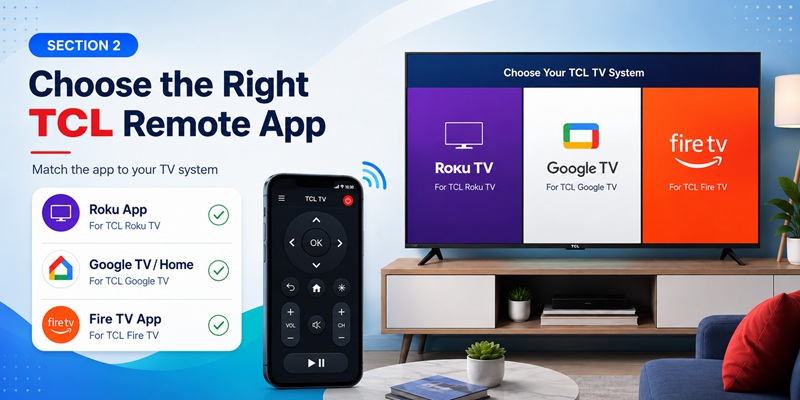
Use this quick tcl tv remote app free selection table before installing anything:
| TCL TV system | Recommended free app | Main devices |
| TCL Roku TV | Roku mobile app | iPhone and Android |
| TCL Google TV | Google TV or Google Home | iPhone and Android |
| TCL Android TV | Google TV or Google Home | iPhone and Android |
| TCL Fire TV | Amazon Fire TV app | iPhone and Android |
| Selected compatible TCL models | TCL Home or MagiConnect/T-Cast | Availability varies |
For TCL Roku TV, the official Roku app is usually the best tcl tv remote app free option. Roku describes it as a free iOS and Android application and requires the phone and Roku device to use the same Wi-Fi network. Roku also advises against third-party remote apps when the official option is available.
For Google TV and Android TV, Google TV provides the virtual remote on Android. Google Home can control key features of TCL Google TV on iPhone, iPad, and Android, including navigation, volume, and app launching.
For TCL Fire TV, the official Fire TV app connects when the phone and TV use the same Wi-Fi. The app requires the user to select the device and follow the on-screen pairing flow.
TCL Home can be useful as a tcl smart tv remote app on supported models. TCL says the app can control compatible TVs from a phone without requiring the user to point the phone at the television.
A tcl 65 inch tv remote app is not chosen by screen size. A 65-inch Roku TV needs Roku, while a 65-inch Google TV needs Google TV or Google Home.
A generic app remote tv tcl search result should normally be tested only after the correct official tcl tv remote app free platform application.
Download the official app that matches the platform instead of trying several generic remote apps.
3. Download the Right TCL TV Remote App for Your TV System
Before completing a tcl tv remote app free installation, identify the operating system shown when the television starts. This prevents the wrong tcl tv remote app free download.
Download a Remote for TCL Roku TV
To complete a tcl tv remote app free download for Roku TV:
- Open Google Play or the Apple App Store.
- Search for Roku.
- Confirm that Roku is the publisher.
- Install the free application.
- Open it and allow Local Network access on iPhone.
- Select Devices after the phone joins the same Wi-Fi as the TV.
The Roku app provides remote navigation, voice search, keyboard entry, channel launching, and Headphone Mode on supported devices.
Download a Remote for TCL Google or Android TV
On Android, install Google TV from Google Play. Open it and use Connect TV or TVs nearby. On iPhone or Android, Google Home can also open a remote for a compatible TCL Google TV.
The official Google TV pairing flow asks the user to select the television, enter the code shown on the screen, and tap Pair.
This is usually the best answer for users searching android tcl tv remote app or tcl tv remote app free for android when the television runs Google TV.
Download a Remote for TCL Fire TV
Open the app store and install Amazon Fire TV. Sign in when requested, connect both devices to the same Wi-Fi, and select the TCL Fire TV.
Amazon’s official guidance uses this same-network setup for mobile remote control.
Download TCL Home or MagiConnect
TCL Home can provide remote functions on selected televisions. MagiConnect/T-Cast is also described by TCL as an alternative remote and casting solution for supported TCL Smart TVs. Compatibility can vary by model and country.
Verify the Official App
Before you download tcl tv remote software, check:
- Publisher or developer
- Supported television platform
- Subscription terms
- Requested permissions
- Recent updates
- Whether the app says it is unofficial
The phrase how to download tcl tv remote should lead to an official tcl tv remote app free listing in an app store, not a website asking you to install a profile, disable security, or download an unknown file.
AInstall the matching official app now, then keep it open for the pairing steps below.
4. How to Connect Your Phone to TCL TV in Minutes
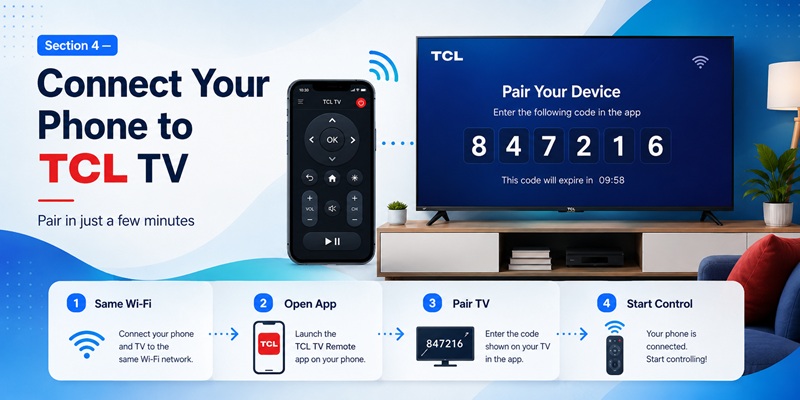
After installing a tcl tv remote app free option, connect the smartphone and television to the same home network. The tcl tv remote app free connection depends on local network access.
Avoid guest Wi-Fi when possible. Guest networks commonly prevent connected devices from communicating with one another, even when both devices have internet access.
Connect TCL Roku TV
- Turn on the TCL Roku TV.
- Connect the phone to the same Wi-Fi.
- Open Roku.
- Tap Devices.
- Select the television.
- Tap Remote.
Roku says the app discovers Roku products on the local network.
Connect TCL Google or Android TV
- Open Google TV or Google Home.
- Select Connect TV, TVs nearby, or the TCL TV under Devices.
- Choose the correct television.
- Enter the code displayed on the screen.
- Tap Pair.
- Test the virtual remote.
Google’s official virtual remote flow uses the displayed code to verify the connection.
Connect TCL Fire TV
- Open Amazon Fire TV.
- Sign in if necessary.
- Select the TCL Fire TV.
- Enter the code shown on the television.
- Test Home, Back, Select, and playback.
Amazon requires the mobile device and Fire TV to share the same network.
After pairing, close and reopen the tcl tv remote app free option. Confirm that it reconnects after the television wakes from standby.
You can also rename several TVs as Living Room, Bedroom, or Office. Clear names make device switching easier and reduce accidental control of the wrong screen.
A good tcl tv remote app free option should connect quickly, show the correct controls, and remain available without requiring a new pairing code every time.
5. TCL TV Remote App Cannot Find Your TV? Try These Quick Fixes
When a tcl tv remote app free option cannot find the television, the tcl tv remote app free setup is usually blocked by the network, permissions, or the wrong platform.
Do not immediately install another app. Most failures can be solved with the steps below.
Confirm the Same Network
Compare the complete Wi-Fi name on the phone and TV. Avoid guest networks because they often isolate connected devices.
Turn off mobile data temporarily if the phone automatically switches away from weak Wi-Fi. Disable a VPN during the test.
Enable Phone Permissions
On iPhone, enable Local Network access for the app.
On Android, allow Nearby Devices, Bluetooth, or Location when the app requires them for discovery.
Restart in the Correct Order
- Close the app.
- Restart the phone.
- Restart the television.
- Restart the router.
- Wait for the TV to reconnect.
- Reopen the app and scan again.
Check Roku Mobile App Control
On TCL Roku TV, open:
Settings > System > Advanced system settings > Control by mobile apps
Roku says this setting controls mobile-app access.
Update the App and TV
Install the latest app version and check the television for software updates. Older Android TV services may prevent the current Google TV app from finding the television.
Confirm the Platform
If Roku cannot find the TV, verify that it is actually a Roku TV. If Google TV does not see it, check whether the screen uses Fire TV, Roku, or another system.
A tcl remote tv app cannot communicate with an incompatible operating system simply because the television is manufactured by TCL.
Test Another Phone
If another phone connects successfully, the problem is likely a permission, VPN, account, or network setting on the first phone.
If neither phone connects, focus on the television and router.
Put both devices on the same private Wi-Fi, enable the required permissions, restart them, and scan again before installing another application.
Download TV Remote App👉 Read Related Articles
Remote TV App: How to Control Your Smart TV From Your Phone
6. Can You Control a TCL TV Without Wi-Fi or the Original Remote?
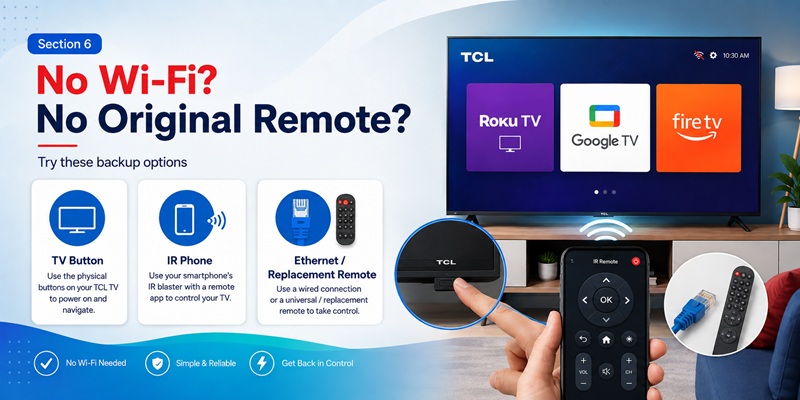
Most tcl tv remote app free options require Wi-Fi. This is a normal requirement for a tcl tv remote app free setup.
Roku, Google TV, Google Home, Amazon Fire TV, and TCL Home normally communicate over the local network.
A tcl tv remote without wifi setup is possible only when another control method is available.
Use the Physical TV Buttons
Look underneath the center or lower edge of the television. Depending on the model, the controller may provide power, input, volume, menu, or basic navigation.
Use it to turn the TV on or restore network access.
Use an Android Phone With an IR Blaster
A tcl tv remote app without wifi can work when:
- The phone has a real infrared transmitter.
- The app includes a compatible TCL code profile.
- The user points the phone toward the TV sensor.
Installing software does not add an IR blaster to a phone that does not have one.
Use Ethernet
If the TCL TV has an Ethernet port, connect it to the router. Once the TV is online, the phone app may discover it over the same local network.
Use a USB Keyboard
Some television platforms accept a USB keyboard for limited navigation and text entry. This can help restore Wi-Fi, although support differs by model.
Use a Physical Universal or Replacement Remote
A physical controller remains the most dependable tcl tv remote control app without wifi alternative.
An iPhone normally cannot operate an infrared-only television without additional hardware. Therefore, searches for tcl tv remote app free iphone or free tcl tv remote app for iphone should be treated as Wi-Fi solutions unless the product clearly uses an external accessory.
If the TV is offline, use its physical button, Ethernet, an IR-capable Android phone, or a replacement remote to reconnect it before trying the app again.
Download TV Remote App7. Which TCL Remote App Features Make TV Control Easier?
The best tcl tv remote app free option should solve everyday problems rather than simply copy the shape of a physical remote.
Phone Keyboard
A keyboard makes Wi-Fi passwords, searches, and account logins faster. The Roku and Google remote systems support easier text entry on compatible devices.
Voice Search
Voice search helps users find content and open apps without typing. Availability depends on the platform, language, permissions, and account.
App Shortcuts
The application may show installed streaming services, allowing one-tap launching.
Private Listening
The Roku app supports Headphone Mode on compatible Roku devices, sending audio to headphones connected to the phone.
Multiple-TV Control
Users with several TCL televisions can switch between registered devices. Rename each TV clearly.
Playback Control
Play, pause, rewind, and fast-forward are easier to reach on a well-designed app.
Casting and Media Sharing
TCL’s T-Cast/MagiConnect offering combines remote control and casting on supported smart TVs.
Fast Reconnection
A good tcl tv remote free app should reconnect after standby instead of requiring the full setup every time.
A tcl tv remote app free option that looks attractive but cannot reconnect consistently is less useful than the simpler official application.
Keep the app that provides the controls you use most often. Remove duplicate remote apps that add confusion or subscriptions without solving a real problem.
📖 Read More TCL TV Guides:
How to Pair an Xfinity Remote With a TCL TV: Step-by-Step Guide
8. Free TCL Remote App vs Paid App: Which One Should You Choose?
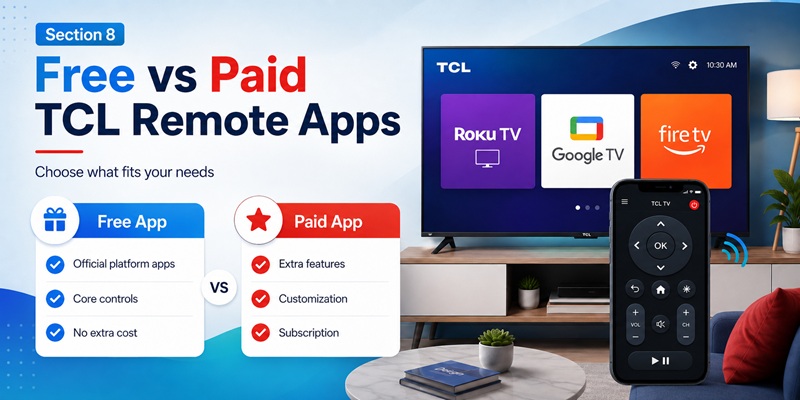
Start with the official tcl tv remote app free option for the television platform. This gives the tcl tv remote app free setup the best chance of working immediately.
| Option | Best for | Main limitation |
| Official platform app | Stable everyday control | Works only with its platform |
| TCL Home or MagiConnect | Selected TCL features and casting | Model or regional limits |
| Third-party free app | Alternative layout | Ads or restricted buttons |
| Paid universal app | Extra customization | Subscription or purchase cost |
| Physical remote | Offline and recovery control | Must match the television |
An official tcl tv remote app free option is usually enough for navigation, playback, keyboard entry, and other core functions.
A paid app may be reasonable, but the tcl tv remote app free option should be tested first when it provides a specific benefit such as widgets, watch support, advanced device switching, or a layout that is genuinely easier to use.
Before starting a trial, check:
- Renewal price
- Trial end date
- Whether power and volume are premium
- Model compatibility
- Cancellation method
- Family-sharing conditions
Do not pay simply because a generic application appears above the official result in search.
The phrase tcl tv remote online free may also lead to web pages with limited or misleading functionality. A browser page cannot automatically replace a tcl tv remote app free option or control every TCL TV without compatible network access or additional setup.
9. Is It Safe to Download TCL Remote APK or Use an Online Remote?
An unknown tcl tv remote pro apk can be modified, while an official tcl tv remote app free download is easier to verify.
An APK may be outdated, repackaged, or configured to request unnecessary permissions. It may also prevent automatic security updates.
Avoid APK files advertised as:
- Premium unlocked
- Modded
- Ad-free cracked version
- Subscription bypass
- Universal remote for every TV
Use this download order:
- Apple App Store or Google Play
- Official TCL, Roku, Google, or Amazon source
- Reputable third-party app-store listing
- APK only when it comes directly from a verified developer
Roku explicitly recommends its official mobile app instead of third-party alternatives for security reasons.
A legitimate tcl tv remote app free option may request Local Network, Wi-Fi, Bluetooth, microphone, or nearby-device permission. A basic remote normally does not need contacts, call logs, SMS messages, or unrelated personal documents.
Do not provide a Roku, Google, Amazon, or TCL password to a website that merely claims to be a remote.
The phrase download remote tv tcl should lead to a verified app-store page, not a download manager or security warning.
Verify the developer before installation and remove any remote app that requests unrelated access or hides its subscription price.
📖 Read More TCL TV Guides:
TCL TV Remote Download: Control Your TCL TV With Your Phone
10. Download a TCL TV Remote App and Start Controlling Your TV
A successful tcl tv remote app free setup follows a simple customer journey, and the tcl tv remote app free process should stay simple.
The right tcl tv remote app free option should solve the problem in minutes:
- Identify the TCL television platform.
- Install the official matching app.
- Connect the phone and TV to the same private Wi-Fi.
- Select the television.
- Enter or approve the pairing code.
- Test Home, Back, navigation, volume, and playback.
- Enable mobile-app control or permissions if discovery fails.
- Keep a physical backup for offline recovery.
Use Roku for TCL Roku TV. Use Google TV or Google Home for TCL Google and Android TV. Use Amazon Fire TV for TCL Fire TV.
Try TCL Home or MagiConnect only when the model and region are supported.
A tcl tv remote iphone setup should normally use Roku, Google Home, Amazon Fire TV, or a compatible TCL application.
A tcl tv remote app free for android setup has the same platform rule, with Google TV available as an additional direct option for Google and Android TV.
The most useful tcl tv remote app free solution is not the one with the most buttons. A reliable tcl tv remote app free option is the one that reconnects quickly.
It should solve the lost-remote problem and give fast access to the controls the household actually uses.
A tcl tv remote app free application is an excellent backup, but it cannot replace physical hardware in every situation. Keep another controller ready for factory resets, network outages, and initial setup.
Identify your TCL TV platform, download the matching official tcl tv remote app free option, connect both devices to the same Wi-Fi, and start controlling your television from your phone today.
Download TCL TV Remote App